
How to get a backlink from 3D Warehouse (SketchUp)?
Use 3D Warehouse as a niche profile backlink when your site has a real connection to SketchUp, 3D models, architecture, interiors, furniture, construction, or product visualization. The fastest defensible method is not to spam model descriptions; it is to complete the public creator profile and add your website as a social link.
Steps
- Create or sign in to a 3D Warehouse / SketchUp account.
- Open your account menu and go to Edit Profile and Settings. In the current app this settings area is served under
/manager/<your-user-id>/settingsafter login. - Complete the public profile basics before adding the link: display name, description, profession/category, avatar, and any relevant public models or collections.
- In the profile settings, find the social link fields and add your URL in the Website field.
- Save the profile and open the public profile URL in a logged-out or private browser session to confirm the Social Links section appears.
A public example profile shows a website icon in the Social Links area that points to an external site: https://3dwarehouse.sketchup.com/user/1227382186648254578622562/mind-sight-studios
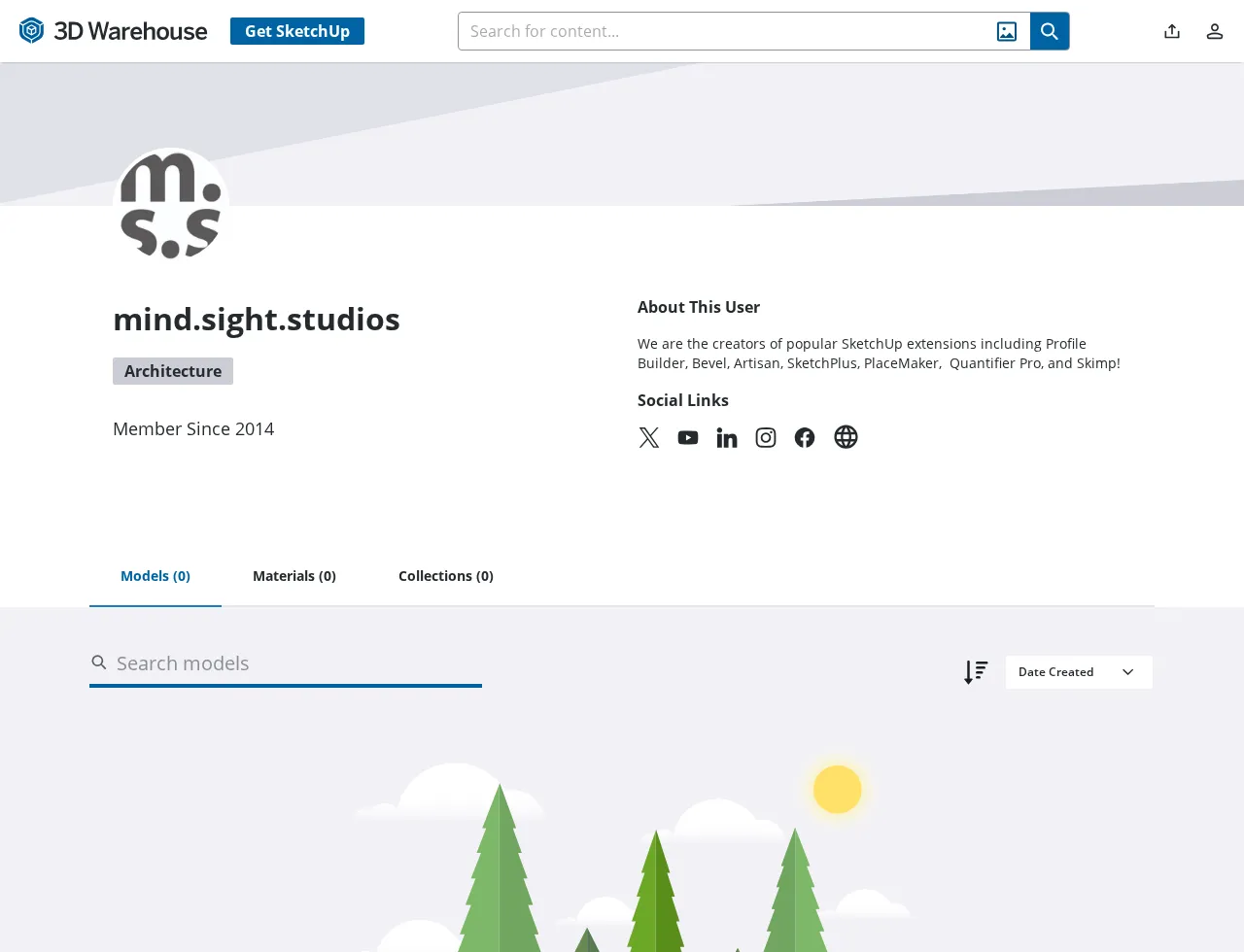
Link attribute and SEO value
The rendered profile example exposes a direct website anchor to https://mindsightstudios.com/ and the hydrated DOM anchor did not include nofollow, ugc, or sponsored tokens during testing. However, the raw fetched profile HTML is a Vue app shell and did not include the outbound anchor before JavaScript rendering. For that reason, treat this as a JavaScript-rendered profile link rather than a clean dofollow SEO link.
The link can still be useful for brand verification, referral visibility, and entity consistency if your audience or portfolio naturally belongs on 3D Warehouse. It is a poor fit for unrelated sites because a thin profile with no models gives readers and crawlers little reason to trust the link.
What to avoid
Do not upload irrelevant or copied models just to place a URL. Keep the website link on the profile, use model descriptions only when they genuinely help explain the model or source, and make the profile look like a real SketchUp creator or organization rather than a link-drop account.
Backlink signals
Editorial estimates for comparing this provider.
- Dofollow links Usually nofollow We set this after checking whether the recommended backlink method on this provider typically outputs a dofollow link in the page HTML. If attributes vary by page type, we use the realistic default for that path and explain the nuance in the guide.
- No . We set this after checking whether the recommended backlink method on this provider typically outputs a dofollow link in the page HTML. If attributes vary by page type, we use the realistic default for that path and explain the nuance in the guide.
- Authority rating Editorial estimate We score the actual backlink surface—not the provider homepage—using Domain Authority when available, otherwise a conservative Backlink Badger editorial estimate. This approximate comparison number may not match third-party tools or the live page's real strength.
- 3/100 . We score the actual backlink surface—not the provider homepage—using Domain Authority when available, otherwise a conservative Backlink Badger editorial estimate. This approximate comparison number may not match third-party tools or the live page's real strength.
- Spam rating Lower is better We use spam score when we have a defensible value for the relevant domain or surface, otherwise a conservative Backlink Badger editorial estimate from platform quality and spam patterns. Treat it as an approximate comparison guide, not a guarantee of how search engines evaluate the site.
- 1/100 . We use spam score when we have a defensible value for the relevant domain or surface, otherwise a conservative Backlink Badger editorial estimate from platform quality and spam patterns. Treat it as an approximate comparison guide, not a guarantee of how search engines evaluate the site.
- Acquisition difficulty Lower is easier Backlink Badger assigns this 0–100 score from editorial review of signup friction, content requirements, approval gates, and account trust for the recommended path. It is an approximate comparison estimate, not a measured difficulty metric.
- 25/100 . Backlink Badger assigns this 0–100 score from editorial review of signup friction, content requirements, approval gates, and account trust for the recommended path. It is an approximate comparison estimate, not a measured difficulty metric.
- Time estimate Typical setup We estimate the minimum minutes a prepared user needs to sign up, set up, and publish or submit the backlink, including obvious waiting steps we can reasonably predict. This Backlink Badger estimate is approximate—your first attempt or extra verification may take longer.
- ~20 min . We estimate the minimum minutes a prepared user needs to sign up, set up, and publish or submit the backlink, including obvious waiting steps we can reasonably predict. This Backlink Badger estimate is approximate—your first attempt or extra verification may take longer.
- Free option No required spend We mark Yes when the recommended backlink path can be completed without paying the provider for access, placement, or a required plan. If only paid tiers unlock the link, or payment is commonly required in practice, we mark No.
- Yes . We mark Yes when the recommended backlink path can be completed without paying the provider for access, placement, or a required plan. If only paid tiers unlock the link, or payment is commonly required in practice, we mark No.
Provider overview
3D Warehouse is SketchUp's public library for searchable 3D models, collections, and creator profiles. A completed creator profile can include a website social link, making it a useful profile-style backlink for architecture, design, product, and 3D-modeling projects.
Minimum requirements to get a backlink from 3D Warehouse (SketchUp)
- Trimble account
- Public creator profile
- Website URL
- Relevant 3D models or collections
Key challenges to get a backlink from 3D Warehouse (SketchUp)
- JavaScript-rendered link: The public profile shows a direct website anchor after the app loads, but the raw HTML does not expose the link.
- Profile quality: Empty accounts look weak; the link is more credible when the profile has relevant models, collections, or a real brand presence.
- Niche fit: 3D Warehouse is best for architecture, interiors, product design, construction, furniture, and other visual 3D work.