
How to get a backlink from Gravatar?
Gravatar is useful when you want a lightweight public identity page that follows you across WordPress-adjacent services. The backlink path is the profile Links section: Gravatar’s Links guide lets you add links to any website from the profile editor, and the Design settings decide whether that section is shown. On its own this is a weak nofollow profile link. It earns the ten minutes when the same profile also travels with you into the WordPress, WordPress.com and bbPress communities where you already post, which is Method 2 below.
Method 1: Add your website to the public Links section (quickest)
- Start from Gravatar and sign in or connect a WordPress.com account. Use the email address you comment and register with elsewhere. Other sites find your avatar by hashing that address, so a different email means a different, empty profile.
- Open the profile editor and complete the basics first: a recognisable avatar, your real or brand name, and a one-line bio. An empty profile with a lone link looks abandoned.
- Go to the Links section, click add link, and enter a Link title and Link URL for the website, product page or portfolio you want listed. Description and image are optional. Links added here are unverified; the separate Verified Accounts section only takes social accounts you can log in to through Gravatar.
- Open Design → Sections and confirm the eye icon next to Links is on. This one toggle controls the profile page and the hovercard together, so hiding the section hides the link everywhere.
- Visit your public profile URL, such as
https://gravatar.com/yourhandle, and check that the link appears in the visible profile cards.
A public example profile shows external profile links and website links in Gravatar’s card layout:
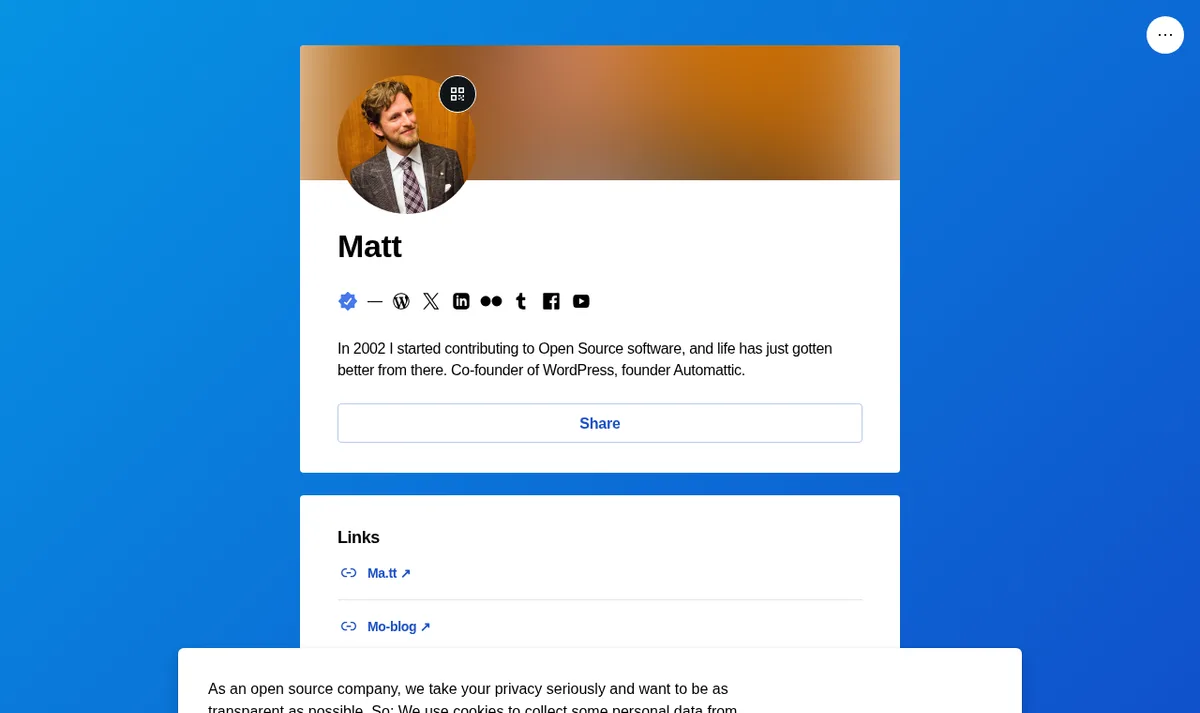
Method 2: Carry the profile into WordPress communities (where the value is)
The profile page itself gets little traffic. The leverage is elsewhere: every WordPress.com blog, Jetpack site and bbPress forum that shows avatars looks up your picture by email, and the ones with hovercards enabled turn that picture into a card linking to your profile and, when the section is visible, your Links. The same identity appears beside every comment and forum reply you write, without you adding a link to any of them. Hovercards are on by default at WordPress.com; self-hosted sites have to switch them on under Jetpack → Settings → Discussion, and many never do.
Aim for two or three communities in your niche where your profile is genuinely visible to readers, not dozens of forum accounts. Start the search with operators like these, swapping in your own topic:
"Powered by bbPress" "email marketing"inurl:forums "bbPress" "photography""Leave a Reply" "SaaS onboarding"
The first two surface bbPress forums, which use WordPress avatars by default. The third surfaces WordPress blogs with open comment sections. Then run each candidate through the checks below.
- Finish Method 1 first. A hovercard that opens on a blank profile wastes the click.
- Shortlist the communities that are relevant to what you publish. A forum full of your potential readers is the point; an unrelated forum that happens to run bbPress is not.
- Check whether Gravatar is actually exposed before you register. Open a live thread or comment section, then hover over and click an existing member’s avatar. You want a hovercard, a clickable profile, or a website field on the member page. If the avatar is a plain image and the member’s name links nowhere, the site only uses Gravatar for pictures and gives you nothing beyond the comment form’s website field.
- Check whether Google can see the discussions. Run a
site:search such assite:forum.example.comand look for indexed threads. Skip forums where every page needs a login, profiles are members-only, or the index is a few hundred stale pages. - Check whether it is alive. Look at the last week of threads: are questions getting replies, are moderators present, do recent posts come from real people rather than spam bots? A small active forum is worth more than a large dead one.
- Register with the same email address as your Gravatar account. The avatar should appear on your first post without any upload. Fill in the community profile too, including the website field if there is one, and keep the bio plain rather than keyword-stuffed.
- Contribute before you link. Answer questions, share what you have tested, and join existing threads. Your Gravatar and hovercard travel with every reply, so each useful answer is another chance for a reader to open your profile.
- Add a link inside a post only when it answers the question. “Great question, check out my site” gets deleted and gets the account flagged. “We tested this on three landing pages and the biggest gain came from cutting form fields; the full breakdown is here” is a link a moderator leaves alone.
- After a month, check what each community sent: referral visits, profile clicks, brand searches, signups or conversations. Keep the two or three that produced anything and drop the rest.
Worth joining when the community is relevant to your site, the threads are indexed, discussions are recent, avatars open a hovercard or profile, and member profiles show a website link. Skip it when threads sit behind a login, the site only renders the avatar image, most recent posts are spam, or the topic has nothing to do with what you publish.
Link quality notes
Do not classify this as a dofollow backlink. The raw HTML of gravatar.com/matt shows external profile-card links such as http://ma.tt with rel="me nofollow noreferrer". WordPress core marks comment-author website links rel="ugc external nofollow", most bbPress profile fields do the same, and Google generally does not follow links carrying those attributes. What remains is a public citation that helps people verify your identity across profiles, not a link equity play.
The upside is discovery. One complete profile appears beside every contribution you make across many WordPress sites, and that turns into referral traffic, brand recognition and the occasional editorial link from someone who found you through an answer. Gravatar profiles are identity pages, not article placements or directory submissions, so do not treat them, or the communities that display them, as a bulk link-building surface.
Backlink signals
Editorial estimates for comparing this provider.
- Dofollow linksUsually nofollowWe set this after checking whether the recommended backlink method on this provider typically outputs a dofollow link in the page HTML. If attributes vary by page type, we use the realistic default for that path and explain the nuance in the guide.
- No. We set this after checking whether the recommended backlink method on this provider typically outputs a dofollow link in the page HTML. If attributes vary by page type, we use the realistic default for that path and explain the nuance in the guide.
- Backlink valueEditorial estimateBacklink value is our 0-100 editorial estimate of how much authority a page you create here would actually carry. We score the page you would end up with - not the provider homepage - from how strongly the platform links to and indexes that page type, how much editorial review stands behind it, and what comparable pages are worth in practice. Most new pages anywhere are worth little; a few platforms hand a fresh page real strength straight away. It is a comparison estimate, not a measurement, and it will not match any third-party tool.
- 5/100. Backlink value is our 0-100 editorial estimate of how much authority a page you create here would actually carry. We score the page you would end up with - not the provider homepage - from how strongly the platform links to and indexes that page type, how much editorial review stands behind it, and what comparable pages are worth in practice. Most new pages anywhere are worth little; a few platforms hand a fresh page real strength straight away. It is a comparison estimate, not a measurement, and it will not match any third-party tool.
- Spam ratingLower is betterWe use spam score when we have a defensible value for the relevant domain or surface, otherwise a conservative Backlink Badger editorial estimate from platform quality and spam patterns. Treat it as an approximate comparison guide, not a guarantee of how search engines evaluate the site.
- 2/100. We use spam score when we have a defensible value for the relevant domain or surface, otherwise a conservative Backlink Badger editorial estimate from platform quality and spam patterns. Treat it as an approximate comparison guide, not a guarantee of how search engines evaluate the site.
- Acquisition difficultyLower is easierBacklink Badger assigns this 0–100 score from editorial review of signup friction, content requirements, approval gates, and account trust for the recommended path. It is an approximate comparison estimate, not a measured difficulty metric.
- 15/100. Backlink Badger assigns this 0–100 score from editorial review of signup friction, content requirements, approval gates, and account trust for the recommended path. It is an approximate comparison estimate, not a measured difficulty metric.
- Time estimateTypical setupWe estimate the minimum minutes a prepared user needs to sign up, set up, and publish or submit the backlink, including obvious waiting steps we can reasonably predict. This Backlink Badger estimate is approximate - your first attempt or extra verification may take longer.
- ~10 min. We estimate the minimum minutes a prepared user needs to sign up, set up, and publish or submit the backlink, including obvious waiting steps we can reasonably predict. This Backlink Badger estimate is approximate - your first attempt or extra verification may take longer.
- Free optionNo required spendWe mark Yes when the recommended backlink path can be completed without paying the provider for access, placement, or a required plan. If only paid tiers unlock the link, or payment is commonly required in practice, we mark No.
- Yes. We mark Yes when the recommended backlink path can be completed without paying the provider for access, placement, or a required plan. If only paid tiers unlock the link, or payment is commonly required in practice, we mark No.
Provider overview
Gravatar is Automattic's public avatar and profile service for people who want one identity across WordPress and other sites. A Gravatar profile can include a visible Links section, so it works as a simple nofollow profile citation or link-in-bio page rather than a high-equity SEO backlink. Its real leverage is that the same profile follows your email address onto every WordPress, WordPress.com and bbPress site that shows avatars.
Minimum requirements to get a backlink from Gravatar
- WordPress.com account
- Public profile
- Destination URL
Key challenges to get a backlink from Gravatar
- Nofollow links: Inspected profile links render with
rel="me nofollow noreferrer", so treat this as referral/entity-discovery value rather than a clean dofollow link. - WordPress.com dependency: Account creation and profile editing run through a WordPress.com login connection.
- Profile visibility: The Links section must remain visible on the public profile; hiding it under Design → Sections removes the links from both the profile page and hovercards.
- Most sites only show the picture: A plain WordPress comment section renders your Gravatar as an image with no link to your profile. Hovercards and clickable profiles exist on WordPress.com, Jetpack sites and some bbPress forums, so check each community before counting on it.
Frequently asked questions about Gravatar backlinks
Are Gravatar backlinks dofollow?
No. Links in the public profile's Links section render with rel="me nofollow noreferrer", so they carry no direct link equity. They still work as a public identity citation and can send referral traffic from communities where your profile is visible.
Do I need a WordPress.com account for Gravatar?
Yes. Gravatar sign-in and profile editing run through a WordPress.com login, and a free WordPress.com account is enough. Once connected, the avatar and profile are tied to the email address you registered with.
Where does a Gravatar link actually show up?
On your public profile at gravatar.com/yourhandle, and on Gravatar hovercards on WordPress.com and Jetpack sites that have hovercards turned on. A plain WordPress comment section shows only the avatar image, so there the website field you fill in when commenting does the linking, not Gravatar.
Similar providers

Smashwords
Nofollow · Free
- Time estimateWe estimate the minimum minutes a prepared user needs to sign up, set up, and publish or submit the backlink, including obvious waiting steps we can reasonably predict. This Backlink Badger estimate is approximate - your first attempt or extra verification may take longer.
- 10m

Discogs
Nofollow · Free
- Time estimateWe estimate the minimum minutes a prepared user needs to sign up, set up, and publish or submit the backlink, including obvious waiting steps we can reasonably predict. This Backlink Badger estimate is approximate - your first attempt or extra verification may take longer.
- 10m

Bitly
Nofollow · Free
- Time estimateWe estimate the minimum minutes a prepared user needs to sign up, set up, and publish or submit the backlink, including obvious waiting steps we can reasonably predict. This Backlink Badger estimate is approximate - your first attempt or extra verification may take longer.
- 10m