How to get a backlink from FileSharing Talk?
FileSharing Talk is only worth considering if your site genuinely belongs around file sharing, Usenet, P2P, VPN, software, or older tech-forum discussions. The cleanest backlink path is the vBulletin Home Page link on a public member profile, not a promotional forum post.
Method: Add your site as the profile homepage
- Open FileSharing Talk registration in a normal browser. This runtime hit a Cloudflare managed challenge on live pages, so a browser session with JavaScript and cookies may be required.
- Create a free forum account and confirm the email address if requested.
- Open your profile settings and look for the vBulletin contact/profile field for Home Page or website URL.
- Add the canonical URL you want associated with the profile and save the profile.
- Visit the public member profile while logged out or in a private window and confirm the Home Page link appears.
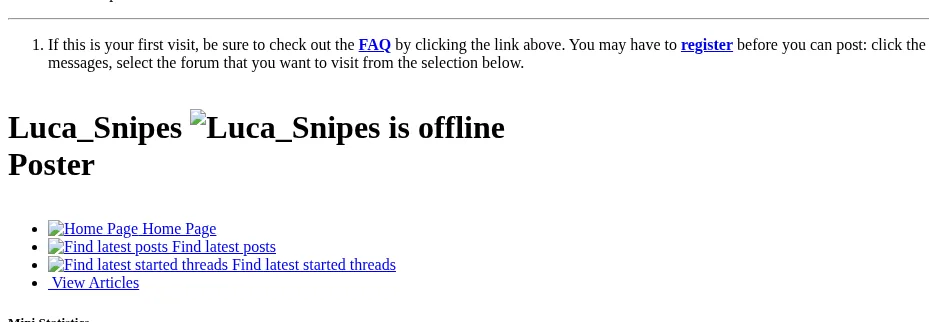
The screenshot below uses an archived FileSharing Talk member profile because the live site blocks headless checks. The inspected archived HTML linked the Home Page anchor directly to http://www.mikeleadley.co.uk with no rel="nofollow", ugc, or sponsored token.
Do not rely on post or signature links for the same value
A sampled archived thread showed post-body and signature links routed through dereferer.me and marked rel="nofollow". Treat those as referral/community links, not clean dofollow backlinks. If you participate in the forum, use links only where they answer the thread and fit the community; thin promotional replies are likely to waste time or create moderation risk.
Because the strongest evidence available here is archived, confirm the current profile editor and public profile output before making FileSharing Talk part of a repeatable backlink process.
Backlink signals
Editorial estimates for comparing this provider.
- Dofollow linksCan pass equityWe set this after checking whether the recommended backlink method on this provider typically outputs a dofollow link in the page HTML. If attributes vary by page type, we use the realistic default for that path and explain the nuance in the guide.
- Yes. We set this after checking whether the recommended backlink method on this provider typically outputs a dofollow link in the page HTML. If attributes vary by page type, we use the realistic default for that path and explain the nuance in the guide.
- Backlink valueEditorial estimateBacklink value is our 0-100 editorial estimate of how much authority a page you create here would actually carry. We score the page you would end up with - not the provider homepage - from how strongly the platform links to and indexes that page type, how much editorial review stands behind it, and what comparable pages are worth in practice. Most new pages anywhere are worth little; a few platforms hand a fresh page real strength straight away. It is a comparison estimate, not a measurement, and it will not match any third-party tool.
- 4/100. Backlink value is our 0-100 editorial estimate of how much authority a page you create here would actually carry. We score the page you would end up with - not the provider homepage - from how strongly the platform links to and indexes that page type, how much editorial review stands behind it, and what comparable pages are worth in practice. Most new pages anywhere are worth little; a few platforms hand a fresh page real strength straight away. It is a comparison estimate, not a measurement, and it will not match any third-party tool.
- Spam ratingLower is betterWe use spam score when we have a defensible value for the relevant domain or surface, otherwise a conservative Backlink Badger editorial estimate from platform quality and spam patterns. Treat it as an approximate comparison guide, not a guarantee of how search engines evaluate the site.
- 1/100. We use spam score when we have a defensible value for the relevant domain or surface, otherwise a conservative Backlink Badger editorial estimate from platform quality and spam patterns. Treat it as an approximate comparison guide, not a guarantee of how search engines evaluate the site.
- Acquisition difficultyLower is easierBacklink Badger assigns this 0–100 score from editorial review of signup friction, content requirements, approval gates, and account trust for the recommended path. It is an approximate comparison estimate, not a measured difficulty metric.
- 35/100. Backlink Badger assigns this 0–100 score from editorial review of signup friction, content requirements, approval gates, and account trust for the recommended path. It is an approximate comparison estimate, not a measured difficulty metric.
- Time estimateTypical setupWe estimate the minimum minutes a prepared user needs to sign up, set up, and publish or submit the backlink, including obvious waiting steps we can reasonably predict. This Backlink Badger estimate is approximate - your first attempt or extra verification may take longer.
- ~15 min. We estimate the minimum minutes a prepared user needs to sign up, set up, and publish or submit the backlink, including obvious waiting steps we can reasonably predict. This Backlink Badger estimate is approximate - your first attempt or extra verification may take longer.
- Free optionNo required spendWe mark Yes when the recommended backlink path can be completed without paying the provider for access, placement, or a required plan. If only paid tiers unlock the link, or payment is commonly required in practice, we mark No.
- Yes. We mark Yes when the recommended backlink path can be completed without paying the provider for access, placement, or a required plan. If only paid tiers unlock the link, or payment is commonly required in practice, we mark No.
Provider overview
FileSharing Talk is an old vBulletin forum for file-sharing, Usenet, BitTorrent, software, and general technology discussions. The useful backlink path is the member profile homepage link; forum-post and signature links should be treated more cautiously because sampled archived threads used nofollow and dereferer wrapping.
Minimum requirements to get a backlink from FileSharing Talk
- FileSharing Talk account
- Website URL for the profile homepage field
- Relevant profile or forum presence
Key challenges to get a backlink from FileSharing Talk
- Cloudflare gate: Live pages returned a managed Cloudflare challenge to automated checks, so verify the workflow in a normal browser before relying on it.
- Forum relevance: Promotional drive-by posting is likely to be moderated and is a poor fit for this niche community.
- Mixed link behavior: The archived profile homepage link had no nofollow token, while sampled post and signature links were nofollow or dereferer-wrapped.
- Low page-level value: A fresh forum profile is much weaker than the root-domain DA suggests.