
How to get a backlink from Instructables?
Instructables is useful when your link belongs with a real maker profile or tutorial. The quickest route is the member profile website field; project links are better only when you can publish a genuine how-to that naturally references your site, docs, product, or resource.
Method 1: Add your website to a member profile
- Create an account at Instructables registration.
- Complete your public profile with a real name or creator identity, short bio, profile image, and relevant interests.
- Add your website or social link in the profile website/social section.
- Save the profile and open the public member page to confirm the link is visible.
- Use this for creator portfolios, maker brands, open-source hardware projects, design studios, recipes, craft blogs, or other sites that fit the Instructables audience.
Example: Randofo’s public Instructables member profile shows a visible Website link plus social/profile links in the member header.
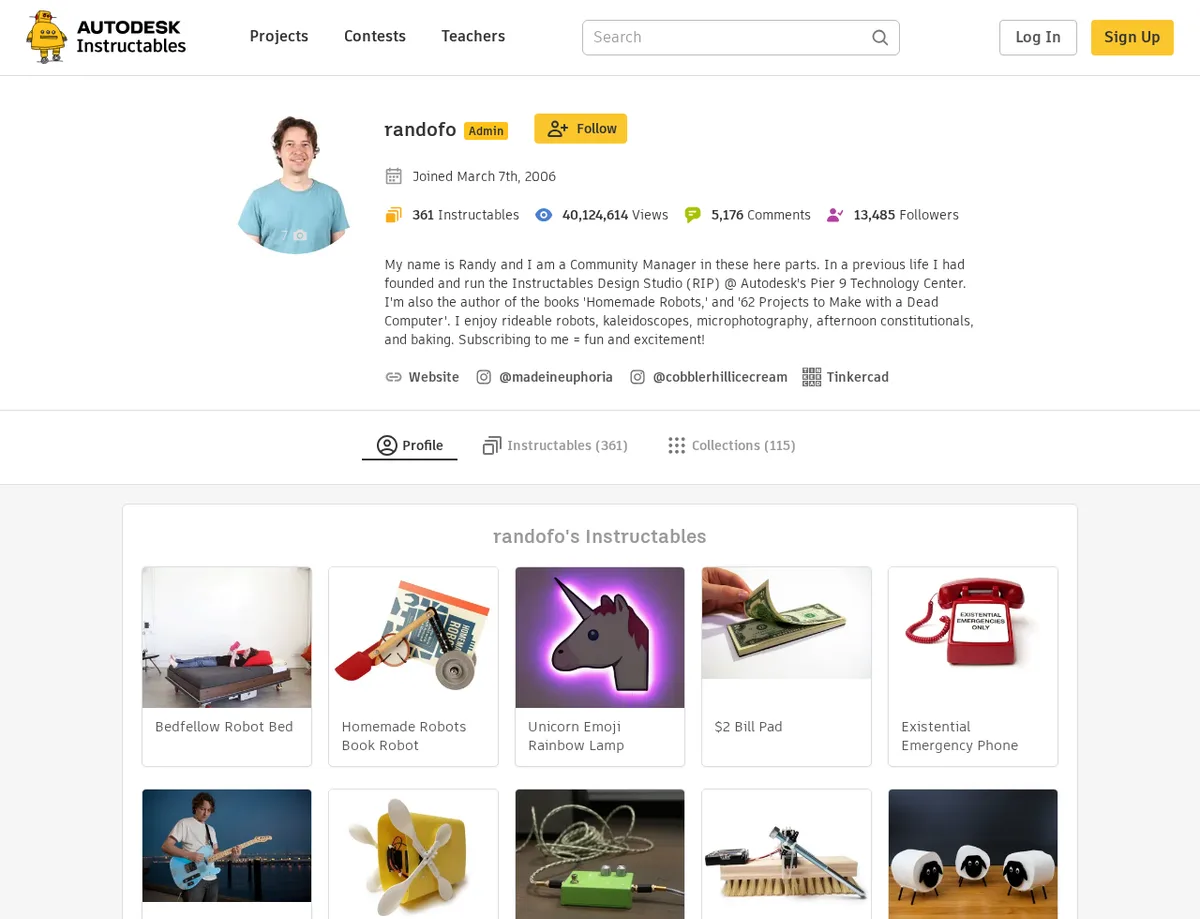
The inspected profile website link to randysarafan.com used rel="noopener noreferrer nofollow". That means the profile link should not be sold as a dofollow authority backlink, but it can still support discovery, referral traffic, and credibility when someone checks the creator behind a project.
Method 2: Publish a tutorial with a relevant resource link
Use this method only when the link supports the tutorial. For example, a woodworking plan, circuit diagram, 3D-print file, recipe source, open-source repository, or detailed build notes can be a useful external reference.
- Sign in and start a new Instructable. The unauthenticated editor URL, editInstructable/new, redirects to login before publishing.
- Build the tutorial around the actual project: materials, tools, photos, steps, and safety notes where needed.
- Add the external link in context, such as a plans download, source code, BOM, template, or extended documentation.
- Publish the project and check the public page for the visible link.
Do not use Instructables as an article directory. The durable play is to publish something a maker, teacher, hobbyist, or DIY reader would still want if search engines ignored the link entirely.
Backlink signals
Editorial estimates for comparing this provider.
- Dofollow linksUsually nofollowWe set this after checking whether the recommended backlink method on this provider typically outputs a dofollow link in the page HTML. If attributes vary by page type, we use the realistic default for that path and explain the nuance in the guide.
- No. We set this after checking whether the recommended backlink method on this provider typically outputs a dofollow link in the page HTML. If attributes vary by page type, we use the realistic default for that path and explain the nuance in the guide.
- Backlink valueEditorial estimateBacklink value is our 0-100 editorial estimate of how much authority a page you create here would actually carry. We score the page you would end up with - not the provider homepage - from how strongly the platform links to and indexes that page type, how much editorial review stands behind it, and what comparable pages are worth in practice. Most new pages anywhere are worth little; a few platforms hand a fresh page real strength straight away. It is a comparison estimate, not a measurement, and it will not match any third-party tool.
- 9/100. Backlink value is our 0-100 editorial estimate of how much authority a page you create here would actually carry. We score the page you would end up with - not the provider homepage - from how strongly the platform links to and indexes that page type, how much editorial review stands behind it, and what comparable pages are worth in practice. Most new pages anywhere are worth little; a few platforms hand a fresh page real strength straight away. It is a comparison estimate, not a measurement, and it will not match any third-party tool.
- Spam ratingLower is betterWe use spam score when we have a defensible value for the relevant domain or surface, otherwise a conservative Backlink Badger editorial estimate from platform quality and spam patterns. Treat it as an approximate comparison guide, not a guarantee of how search engines evaluate the site.
- 3/100. We use spam score when we have a defensible value for the relevant domain or surface, otherwise a conservative Backlink Badger editorial estimate from platform quality and spam patterns. Treat it as an approximate comparison guide, not a guarantee of how search engines evaluate the site.
- Acquisition difficultyLower is easierBacklink Badger assigns this 0–100 score from editorial review of signup friction, content requirements, approval gates, and account trust for the recommended path. It is an approximate comparison estimate, not a measured difficulty metric.
- 35/100. Backlink Badger assigns this 0–100 score from editorial review of signup friction, content requirements, approval gates, and account trust for the recommended path. It is an approximate comparison estimate, not a measured difficulty metric.
- Time estimateTypical setupWe estimate the minimum minutes a prepared user needs to sign up, set up, and publish or submit the backlink, including obvious waiting steps we can reasonably predict. This Backlink Badger estimate is approximate - your first attempt or extra verification may take longer.
- ~20 min. We estimate the minimum minutes a prepared user needs to sign up, set up, and publish or submit the backlink, including obvious waiting steps we can reasonably predict. This Backlink Badger estimate is approximate - your first attempt or extra verification may take longer.
- Free optionNo required spendWe mark Yes when the recommended backlink path can be completed without paying the provider for access, placement, or a required plan. If only paid tiers unlock the link, or payment is commonly required in practice, we mark No.
- Yes. We mark Yes when the recommended backlink path can be completed without paying the provider for access, placement, or a required plan. If only paid tiers unlock the link, or payment is commonly required in practice, we mark No.
- Linking domainsExternal signalWhen shown, this optional count comes from SEO research on the provider or relevant backlink surface and is rounded with a ~ prefix on the page. It is a Backlink Badger estimate for comparison and may be outdated or imprecise versus live crawlers.
- ~62,000. When shown, this optional count comes from SEO research on the provider or relevant backlink surface and is rounded with a ~ prefix on the page. It is a Backlink Badger estimate for comparison and may be outdated or imprecise versus live crawlers.
- Ranking keywordsExternal signalWhen shown, this count reflects researched ranking-keyword data for the provider domain or surface, displayed as an approximate ~ value. Treat it as a Backlink Badger comparison estimate that can drift as indexes and rankings change.
- ~900,000. When shown, this count reflects researched ranking-keyword data for the provider domain or surface, displayed as an approximate ~ value. Treat it as a Backlink Badger comparison estimate that can drift as indexes and rankings change.
- Inbound linksExternal signalWhen shown, this is an optional researched count of inbound links to the provider or relevant surface, formatted as an approximate estimate. Backlink Badger includes it only when defensible - it is not live-crawled data.
- ~12,000,000. When shown, this is an optional researched count of inbound links to the provider or relevant surface, formatted as an approximate estimate. Backlink Badger includes it only when defensible - it is not live-crawled data.
- Outbound linksExternal signalWhen shown, this optional count estimates outbound links from pages on the provider domain to other sites, included only when researched and defensible. It is a Backlink Badger approximate comparison figure, not a real-time crawl.
- ~1,900,000. When shown, this optional count estimates outbound links from pages on the provider domain to other sites, included only when researched and defensible. It is a Backlink Badger approximate comparison figure, not a real-time crawl.
Provider overview
Instructables is a public tutorial and maker-project community where members publish profiles, how-to projects, and collections. It can host a backlink in a member profile website field or inside a genuinely useful tutorial when the link helps the reader.
Minimum requirements to get a backlink from Instructables
- Instructables account
- Public profile
- Website or social URL
- Useful tutorial for project links
Key challenges to get a backlink from Instructables
- Nofollow links: Inspected member profile links use
rel="noopener noreferrer nofollow", so treat this as referral and discovery value rather than a dofollow SEO link. - Real project fit: Tutorial links need a real how-to, build, recipe, craft, or maker resource; thin promotional posts are a poor fit.
- Login and moderation: Publishing requires an account, and obvious spam or low-effort projects can be ignored, moderated, or removed.
Similar providers

Imgur
Nofollow · Free
- Time estimateWe estimate the minimum minutes a prepared user needs to sign up, set up, and publish or submit the backlink, including obvious waiting steps we can reasonably predict. This Backlink Badger estimate is approximate - your first attempt or extra verification may take longer.
- 20m

Flipboard
Nofollow · Free
- Time estimateWe estimate the minimum minutes a prepared user needs to sign up, set up, and publish or submit the backlink, including obvious waiting steps we can reasonably predict. This Backlink Badger estimate is approximate - your first attempt or extra verification may take longer.
- 20m

Vimeo
Nofollow · Free
- Time estimateWe estimate the minimum minutes a prepared user needs to sign up, set up, and publish or submit the backlink, including obvious waiting steps we can reasonably predict. This Backlink Badger estimate is approximate - your first attempt or extra verification may take longer.
- 20m