
How to get a backlink from LiveInternet?
LiveInternet is useful only if you are comfortable treating the backlink as a stats/ranking-directory listing. The practical route is to register your own website for LiveInternet statistics, install the counter, and opt into the most relevant public rating category.
Best method: register your site for the LiveInternet rating
- Open the site registration form.
- Enter the website URL in Адрес and add aliases if your site uses multiple hostnames.
- Fill in the site name, email, password, and keywords.
- In Статистика, decide whether the statistics page should be public or password-protected. A fully private setup is less useful for discovery.
- In Участие в рейтингах, choose the closest category instead of leaving the site out of ratings.
- Add the generated LiveInternet counter code to the registered site or directory. LiveInternet’s address help page says the counter should be placed on the pages covered by the registered URL.
- After the counter records visits, check the relevant rating page for your category.
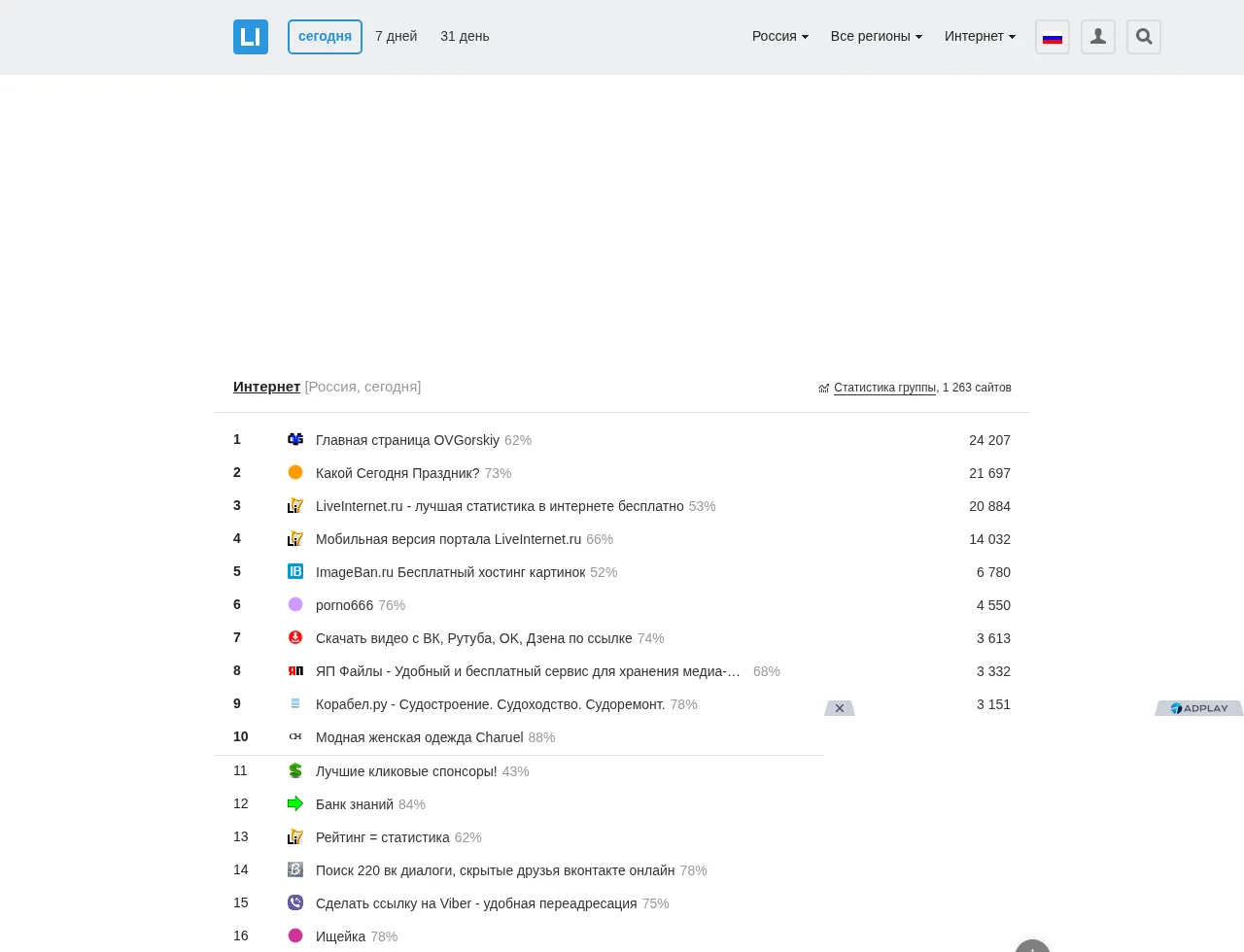
The public rating page renders rows with site titles, visitor counts, links to LiveInternet stats pages, and direct outbound links to listed websites.
Link quality and caveats
The inspected rendered rating rows used direct external anchors such as http://ovgorskiy.ru/ and did not include a rel="nofollow", ugc, or sponsored attribute. However, those anchors were not present in the first fetched HTML; the page loads a TSV file and JavaScript builds the ranking rows in the browser.
Because of that JavaScript dependency, treat this as a visibility/referral opportunity rather than a clean dofollow SEO backlink. It is more defensible for sites that actually want LiveInternet analytics or Russian web-directory visibility than for sites looking for a quick authority link.
What can waste your time
Do not register a fake site or install the counter only to chase a link. The ranking surface is based on traffic, so a new site with few visitors may be technically listed but practically invisible. Also avoid unrelated categories: the listing title and category context are public, and mismatches make the placement look spammy.
Backlink signals
Editorial estimates for comparing this provider.
- Dofollow links Usually nofollow We set this after checking whether the recommended backlink method on this provider typically outputs a dofollow link in the page HTML. If attributes vary by page type, we use the realistic default for that path and explain the nuance in the guide.
- No . We set this after checking whether the recommended backlink method on this provider typically outputs a dofollow link in the page HTML. If attributes vary by page type, we use the realistic default for that path and explain the nuance in the guide.
- Authority rating Editorial estimate We score the actual backlink surface—not the provider homepage—using Domain Authority when available, otherwise a conservative Backlink Badger editorial estimate. This approximate comparison number may not match third-party tools or the live page's real strength.
- 6/100 . We score the actual backlink surface—not the provider homepage—using Domain Authority when available, otherwise a conservative Backlink Badger editorial estimate. This approximate comparison number may not match third-party tools or the live page's real strength.
- Spam rating Lower is better We use spam score when we have a defensible value for the relevant domain or surface, otherwise a conservative Backlink Badger editorial estimate from platform quality and spam patterns. Treat it as an approximate comparison guide, not a guarantee of how search engines evaluate the site.
- 8/100 . We use spam score when we have a defensible value for the relevant domain or surface, otherwise a conservative Backlink Badger editorial estimate from platform quality and spam patterns. Treat it as an approximate comparison guide, not a guarantee of how search engines evaluate the site.
- Acquisition difficulty Lower is easier Backlink Badger assigns this 0–100 score from editorial review of signup friction, content requirements, approval gates, and account trust for the recommended path. It is an approximate comparison estimate, not a measured difficulty metric.
- 45/100 . Backlink Badger assigns this 0–100 score from editorial review of signup friction, content requirements, approval gates, and account trust for the recommended path. It is an approximate comparison estimate, not a measured difficulty metric.
- Time estimate Typical setup We estimate the minimum minutes a prepared user needs to sign up, set up, and publish or submit the backlink, including obvious waiting steps we can reasonably predict. This Backlink Badger estimate is approximate—your first attempt or extra verification may take longer.
- ~30 min . We estimate the minimum minutes a prepared user needs to sign up, set up, and publish or submit the backlink, including obvious waiting steps we can reasonably predict. This Backlink Badger estimate is approximate—your first attempt or extra verification may take longer.
- Free option No required spend We mark Yes when the recommended backlink path can be completed without paying the provider for access, placement, or a required plan. If only paid tiers unlock the link, or payment is commonly required in practice, we mark No.
- Yes . We mark Yes when the recommended backlink path can be completed without paying the provider for access, placement, or a required plan. If only paid tiers unlock the link, or payment is commonly required in practice, we mark No.
Provider overview
LiveInternet is a Russian web statistics and public site-rating service. A site owner can register a website, install the LiveInternet counter, opt into a rating category, and potentially receive a public listing that links back to the registered site.
Minimum requirements to get a backlink from LiveInternet
- Website you control
- LiveInternet counter code
- Russian category selection
Key challenges to get a backlink from LiveInternet
- Counter required: LiveInternet expects its tracking counter to be installed on the registered site or directory.
- JS-rendered link: Rating rows render direct external links in the browser, but the links are populated from TSV data by JavaScript instead of appearing in the first HTML response.
- Traffic ranking: New or low-traffic sites may be buried because category positions are sorted by visitor counts.
- Russian interface: The signup form, help pages, and category labels are primarily Russian.