
How to get a backlink from Google Sites?
Google Sites works as a backlink source when you publish a real mini-site, portfolio page, documentation hub, or resource page that belongs on a public Google Sites URL. The fastest path is to create a public site, add your destination URL as a button or text link, and publish the page so anyone with the URL can view it.
Recommended method: publish a small public site with a visible external link
- Open sites.google.com/new while signed in to a Google account.
- Choose a blank site or a template, then give the site a clear name and page title.
- Add enough context for the page to stand alone: who the project is for, what the linked resource does, and why the link is useful.
- Add your backlink as a Button, text link, or embedded HTML section. Keep the anchor text descriptive rather than using a bare URL everywhere.
- Click Publish, choose a public web address, and confirm the sharing settings allow public visitors to view the site.
- Open the published
sites.google.com/view/...URL in a private browser window and confirm the link is visible without signing in.
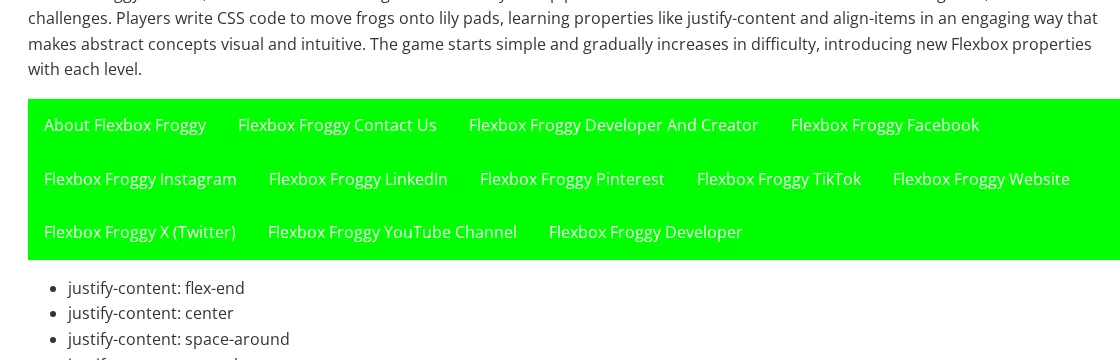
The public Flexbox Froggy example below shows a Google Sites page with a grid of external links to Codepip, social profiles, and the Flexbox Froggy website. Browser DOM inspection found those example anchors without a nofollow, ugc, or sponsored rel token, so the method is dofollow-looking. Treat that as link-attribute evidence, not a guarantee that every Sites page will receive meaningful SEO value.
What to verify before you rely on the link
Google Sites is useful for a legitimate hosted page, but it is not a shortcut to Google’s domain authority. Publish a page that would make sense for users even if SEO did not exist: a project landing page, classroom/resource hub, portfolio, event page, or lightweight documentation site. After publishing, check the live page source or rendered DOM for your specific link, because Google Sites pages are JavaScript-heavy and the practical crawl/indexing behavior can vary by layout and embedded content.
If you need a custom domain, use Google Sites’ custom-domain workflow after the public page is working. The backlink opportunity still comes from the page content itself; a custom domain mostly changes branding and URL control.
Backlink signals
Editorial estimates for comparing this provider.
- Dofollow linksCan pass equityWe set this after checking whether the recommended backlink method on this provider typically outputs a dofollow link in the page HTML. If attributes vary by page type, we use the realistic default for that path and explain the nuance in the guide.
- Yes. We set this after checking whether the recommended backlink method on this provider typically outputs a dofollow link in the page HTML. If attributes vary by page type, we use the realistic default for that path and explain the nuance in the guide.
- Backlink valueEditorial estimateBacklink value is our 0-100 editorial estimate of how much authority a page you create here would actually carry. We score the page you would end up with - not the provider homepage - from how strongly the platform links to and indexes that page type, how much editorial review stands behind it, and what comparable pages are worth in practice. Most new pages anywhere are worth little; a few platforms hand a fresh page real strength straight away. It is a comparison estimate, not a measurement, and it will not match any third-party tool.
- 3/100. Backlink value is our 0-100 editorial estimate of how much authority a page you create here would actually carry. We score the page you would end up with - not the provider homepage - from how strongly the platform links to and indexes that page type, how much editorial review stands behind it, and what comparable pages are worth in practice. Most new pages anywhere are worth little; a few platforms hand a fresh page real strength straight away. It is a comparison estimate, not a measurement, and it will not match any third-party tool.
- Spam ratingLower is betterWe use spam score when we have a defensible value for the relevant domain or surface, otherwise a conservative Backlink Badger editorial estimate from platform quality and spam patterns. Treat it as an approximate comparison guide, not a guarantee of how search engines evaluate the site.
- 1/100. We use spam score when we have a defensible value for the relevant domain or surface, otherwise a conservative Backlink Badger editorial estimate from platform quality and spam patterns. Treat it as an approximate comparison guide, not a guarantee of how search engines evaluate the site.
- Acquisition difficultyLower is easierBacklink Badger assigns this 0–100 score from editorial review of signup friction, content requirements, approval gates, and account trust for the recommended path. It is an approximate comparison estimate, not a measured difficulty metric.
- 35/100. Backlink Badger assigns this 0–100 score from editorial review of signup friction, content requirements, approval gates, and account trust for the recommended path. It is an approximate comparison estimate, not a measured difficulty metric.
- Time estimateTypical setupWe estimate the minimum minutes a prepared user needs to sign up, set up, and publish or submit the backlink, including obvious waiting steps we can reasonably predict. This Backlink Badger estimate is approximate - your first attempt or extra verification may take longer.
- ~30 min. We estimate the minimum minutes a prepared user needs to sign up, set up, and publish or submit the backlink, including obvious waiting steps we can reasonably predict. This Backlink Badger estimate is approximate - your first attempt or extra verification may take longer.
- Free optionNo required spendWe mark Yes when the recommended backlink path can be completed without paying the provider for access, placement, or a required plan. If only paid tiers unlock the link, or payment is commonly required in practice, we mark No.
- Yes. We mark Yes when the recommended backlink path can be completed without paying the provider for access, placement, or a required plan. If only paid tiers unlock the link, or payment is commonly required in practice, we mark No.
Provider overview
Google Sites is a free website builder tied to Google accounts. A public Google Sites page can host buttons, text links, embedded content, and resource pages that point to an external project or company site.
Minimum requirements to get a backlink from Google Sites
- Google account
- Public site name and path
- Useful page content
- Destination URL
Key challenges to get a backlink from Google Sites
- Page-level value: A fresh Google Sites page should not inherit Google's root-domain authority; it needs real content and internal discovery to matter.
- Indexing uncertainty: Sites pages are generated by Google Sites and may use embedded frames, so verify that important links render publicly and keep SEO expectations conservative.
- Quality requirement: Thin one-page link dumps look spammy and are unlikely to earn clicks, shares, or durable search visibility.
Similar providers

Weebly
Dofollow · Free
- Time estimateWe estimate the minimum minutes a prepared user needs to sign up, set up, and publish or submit the backlink, including obvious waiting steps we can reasonably predict. This Backlink Badger estimate is approximate - your first attempt or extra verification may take longer.
- 30m
Zoho Sites
Dofollow · Free
- Time estimateWe estimate the minimum minutes a prepared user needs to sign up, set up, and publish or submit the backlink, including obvious waiting steps we can reasonably predict. This Backlink Badger estimate is approximate - your first attempt or extra verification may take longer.
- 30m

PBworks
Dofollow · Free
- Time estimateWe estimate the minimum minutes a prepared user needs to sign up, set up, and publish or submit the backlink, including obvious waiting steps we can reasonably predict. This Backlink Badger estimate is approximate - your first attempt or extra verification may take longer.
- 30m