
How to get a backlink from Microsoft Q&A?
Microsoft Answers now redirects into Microsoft Q&A on Microsoft Learn. Use it only when you can answer a real Microsoft product question or ask a well-scoped question that needs an outside resource; the link should support the troubleshooting thread, not advertise your site.
Method: cite a useful resource in a Microsoft Q&A answer
- Sign in to Microsoft Learn with a Microsoft account.
- Find a Microsoft Q&A thread where you can give a specific, on-topic answer. Start with product tags such as Windows, Microsoft 365, Azure, or Microsoft Graph.
- Write the answer first: explain the fix, limitation, or diagnostic step in enough detail that the post stands on its own.
- Add your external URL only where it helps the reader, such as a tool release, reproducible sample, detailed guide, or source documentation.
- Publish the answer and re-open the public thread to confirm the link appears. Inspected external links on Microsoft Q&A render with
rel="ugc nofollow".
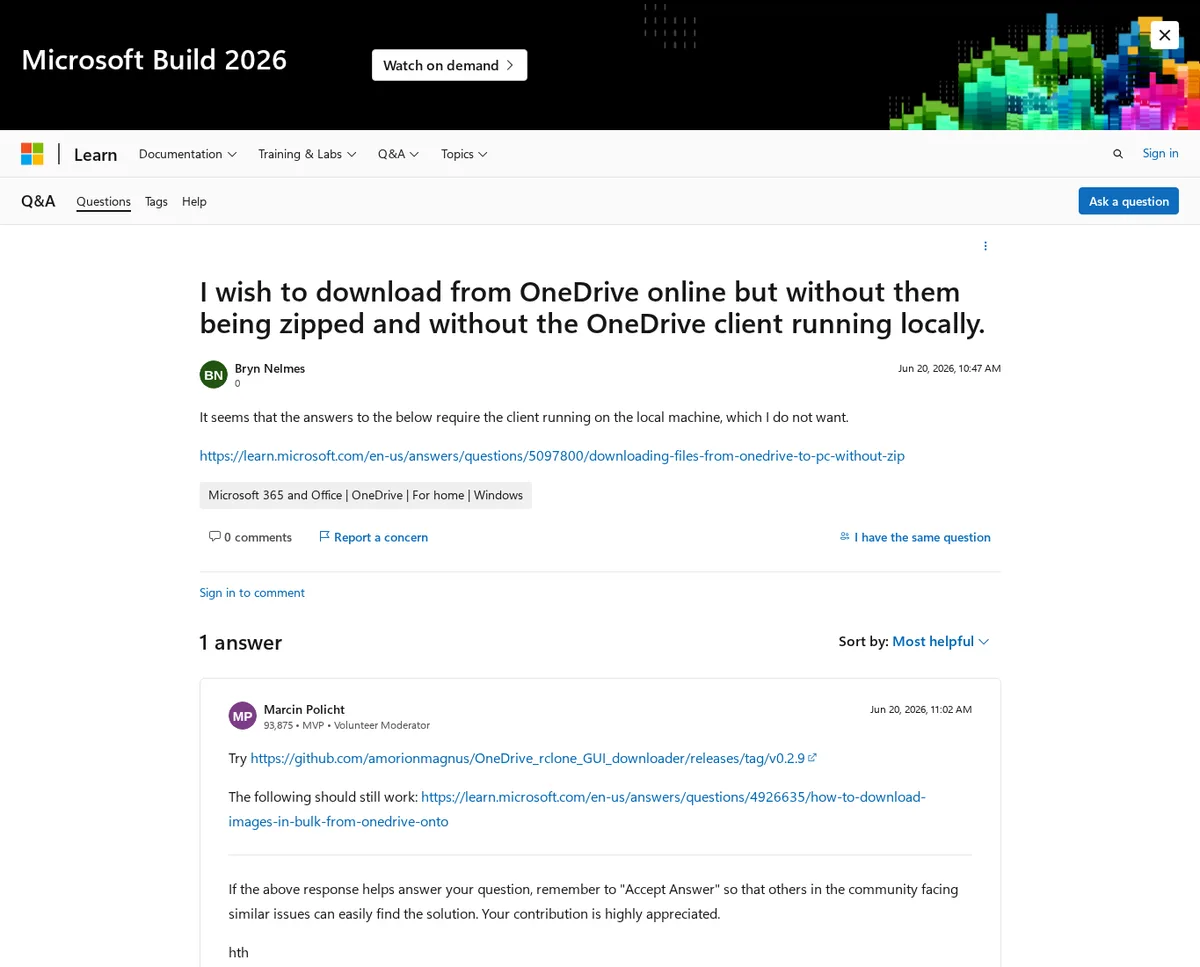
Example: this Microsoft Q&A answer includes a visible GitHub release link, and browser DOM inspection showed the link attribute as rel="ugc nofollow".
What not to do
Do not treat Microsoft Q&A as a generic article directory. Microsoft’s quality answer guidance tells contributors to understand the question, consider the audience, and reference outside work with context. The Code of Conduct explicitly disallows spam and phishing, so thin answers whose only purpose is a backlink are likely to disappear and can damage the account.
Link quality notes
This is a nofollow community backlink. The value is mainly referral traffic, brand visibility in Microsoft Learn search, and the chance that a strong answer is found by developers or administrators troubleshooting the same issue. Because the page is user-generated and moderated, use conservative expectations even though the host domain is highly trusted.
Backlink signals
Editorial estimates for comparing this provider.
- Dofollow linksUsually nofollowWe set this after checking whether the recommended backlink method on this provider typically outputs a dofollow link in the page HTML. If attributes vary by page type, we use the realistic default for that path and explain the nuance in the guide.
- No. We set this after checking whether the recommended backlink method on this provider typically outputs a dofollow link in the page HTML. If attributes vary by page type, we use the realistic default for that path and explain the nuance in the guide.
- Backlink valueEditorial estimateBacklink value is our 0-100 editorial estimate of how much authority a page you create here would actually carry. We score the page you would end up with - not the provider homepage - from how strongly the platform links to and indexes that page type, how much editorial review stands behind it, and what comparable pages are worth in practice. Most new pages anywhere are worth little; a few platforms hand a fresh page real strength straight away. It is a comparison estimate, not a measurement, and it will not match any third-party tool.
- 16/100. Backlink value is our 0-100 editorial estimate of how much authority a page you create here would actually carry. We score the page you would end up with - not the provider homepage - from how strongly the platform links to and indexes that page type, how much editorial review stands behind it, and what comparable pages are worth in practice. Most new pages anywhere are worth little; a few platforms hand a fresh page real strength straight away. It is a comparison estimate, not a measurement, and it will not match any third-party tool.
- Spam ratingLower is betterWe use spam score when we have a defensible value for the relevant domain or surface, otherwise a conservative Backlink Badger editorial estimate from platform quality and spam patterns. Treat it as an approximate comparison guide, not a guarantee of how search engines evaluate the site.
- 1/100. We use spam score when we have a defensible value for the relevant domain or surface, otherwise a conservative Backlink Badger editorial estimate from platform quality and spam patterns. Treat it as an approximate comparison guide, not a guarantee of how search engines evaluate the site.
- Acquisition difficultyLower is easierBacklink Badger assigns this 0–100 score from editorial review of signup friction, content requirements, approval gates, and account trust for the recommended path. It is an approximate comparison estimate, not a measured difficulty metric.
- 45/100. Backlink Badger assigns this 0–100 score from editorial review of signup friction, content requirements, approval gates, and account trust for the recommended path. It is an approximate comparison estimate, not a measured difficulty metric.
- Time estimateTypical setupWe estimate the minimum minutes a prepared user needs to sign up, set up, and publish or submit the backlink, including obvious waiting steps we can reasonably predict. This Backlink Badger estimate is approximate - your first attempt or extra verification may take longer.
- ~25 min. We estimate the minimum minutes a prepared user needs to sign up, set up, and publish or submit the backlink, including obvious waiting steps we can reasonably predict. This Backlink Badger estimate is approximate - your first attempt or extra verification may take longer.
- Free optionNo required spendWe mark Yes when the recommended backlink path can be completed without paying the provider for access, placement, or a required plan. If only paid tiers unlock the link, or payment is commonly required in practice, we mark No.
- Yes. We mark Yes when the recommended backlink path can be completed without paying the provider for access, placement, or a required plan. If only paid tiers unlock the link, or payment is commonly required in practice, we mark No.
Provider overview
Microsoft Q&A is Microsoft's public technical question-and-answer community on Microsoft Learn. Users can ask questions and post answers for Microsoft products, and relevant answers can cite outside resources with visible external links.
Minimum requirements to get a backlink from Microsoft Q&A
- Microsoft account
- Microsoft Learn profile
- Relevant technical answer or question
- Helpful source or documentation URL
Key challenges to get a backlink from Microsoft Q&A
- Nofollow UGC links: External links in inspected answers use
rel="ugc nofollow", so treat them as referral and visibility links rather than direct authority links. - Relevance gate: Links belong only when they genuinely help solve a Microsoft product question; promotional or off-topic answers can be edited, deleted, or reported.
- Account and moderation friction: Posting requires a Microsoft Learn sign-in, and community rules discourage spam, copied answers, and unsupported claims.