How to get a backlink from Chrome Web Store?
The backlink comes from your extension’s public store listing: its Website link under Details, plus an optional support site link. You need a real extension that passes Google’s review. This is a product-distribution opportunity with a backlink attached, not a directory where you submit a business URL on its own.
Steps
-
Build and test a small extension with one clear purpose. A calculator that works in the popup, a useful page inspector, or a browser-based companion to your product is a better starting point than a shortcut to your homepage. Google’s minimum-functionality and spam guidance rules out extensions whose sole purpose is launching another webpage and tools that only link out to someone else’s functionality.
-
Register a developer account through the Chrome Web Store Developer Dashboard. New publishers pay a one-time $5 registration fee; Google confirms the amount in its publisher account guidance. Enable two-step verification before publishing.
-
Upload your extension ZIP and complete the Store listing. Prepare an accurate description, icon, screenshots and category. In Homepage URL, enter a relevant page explaining the extension or the service it supports. Add a Support URL if you have a dedicated help page. Google’s listing documentation explains both link fields; the homepage link appears under Details.
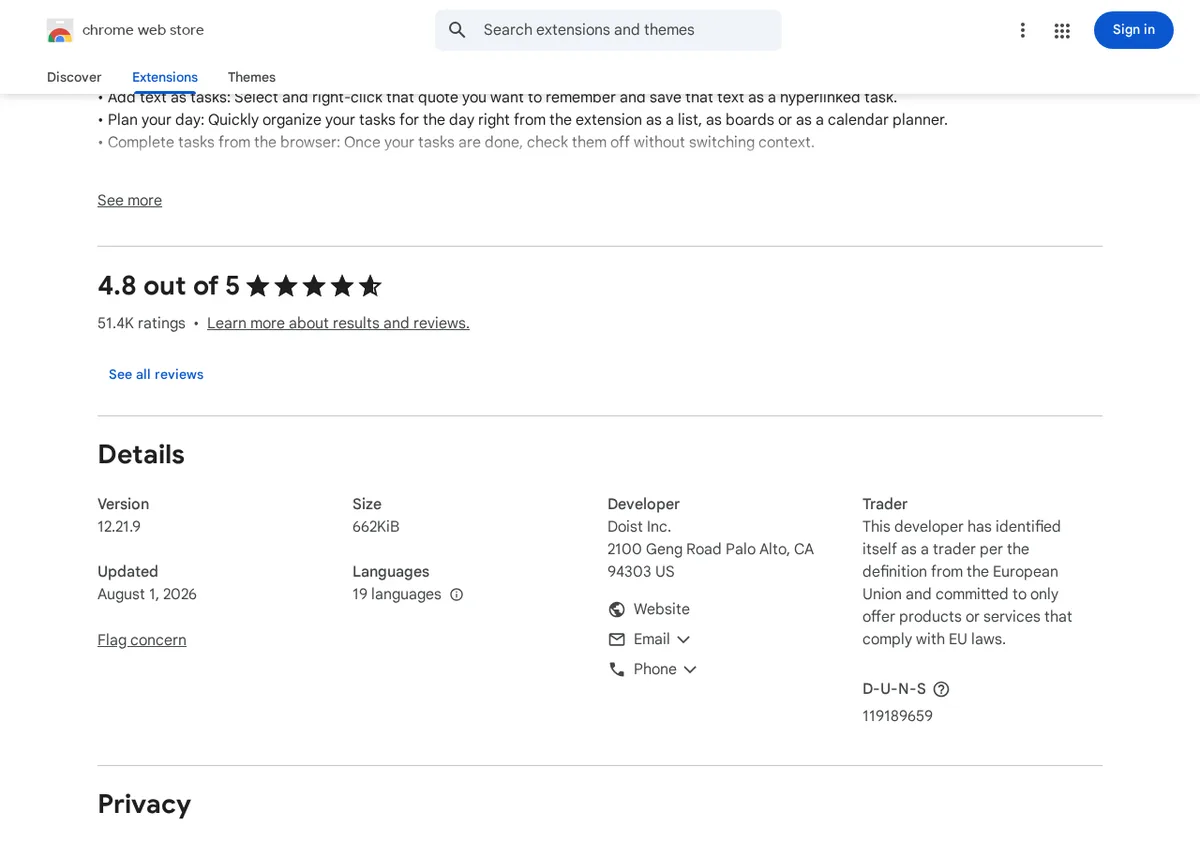
The Todoist extension listing shows the public result: a Website link under the developer details.
-
Complete Privacy, Distribution and any necessary Test instructions. Explain the extension’s single purpose, justify requested permissions, disclose data handling accurately and provide a privacy policy where required. Keep permissions limited to what the feature actually needs. See Google’s privacy practices guidance.
-
Choose public distribution if you want a discoverable listing, then submit for review. Google says most reviews finish within a few days, but some take a few weeks. That waiting time is separate from development and listing preparation; the three-hour estimate here is an editorial starting point for a small tool, not a delivery or approval promise.
-
After approval and publication, open the listing while signed out. Check that Website points to the correct page, the support link works and the extension does what the description promises. Recheck after updates rather than assuming your listing and links will remain unchanged.
What kind of backlink do you get?
On October 16, 2026, both the raw HTML and rendered browser DOM of the Todoist listing showed:
- Website:
https://todoist.com/, withrel="ugc nofollow". - support site:
https://todoist.com/help, also withrel="ugc nofollow".
These were direct outbound anchors, not Web Store tracking redirects. They are not clean dofollow backlinks. Google’s domain reputation also does not make a brand-new extension listing an equally authoritative page; our backlink-value estimate applies to the new listing, not Google’s root domain or Todoist’s established listing.
When the effort makes sense
A useful extension can give your business another public branded page, a place for users to discover your tool, and a route back to your product. Keep the branding consistent and link to a page that helps extension users understand the next step. A relevant product action can support that journey, but the extension should deliver value before asking users to leave it.
Do not budget on guaranteed store traffic, Google indexing, search rankings or AI-search citations. A listing is an additional public reference to your product, not proof that an AI system will recognize it as an entity or recommend it. Build the extension when the browser feature itself is worth offering; treat the listing and nofollow links as supporting benefits.
Backlink signals
Editorial estimates for comparing this provider.
- Dofollow linksUsually nofollowWe set this after checking whether the recommended backlink method on this provider typically outputs a dofollow link in the page HTML. If attributes vary by page type, we use the realistic default for that path and explain the nuance in the guide.
- No. We set this after checking whether the recommended backlink method on this provider typically outputs a dofollow link in the page HTML. If attributes vary by page type, we use the realistic default for that path and explain the nuance in the guide.
- Backlink valueEditorial estimateBacklink value is our 0-100 editorial estimate of how much authority a page you create here would actually carry. We score the page you would end up with - not the provider homepage - from how strongly the platform links to and indexes that page type, how much editorial review stands behind it, and what comparable pages are worth in practice. Most new pages anywhere are worth little; a few platforms hand a fresh page real strength straight away. It is a comparison estimate, not a measurement, and it will not match any third-party tool.
- 7/100. Backlink value is our 0-100 editorial estimate of how much authority a page you create here would actually carry. We score the page you would end up with - not the provider homepage - from how strongly the platform links to and indexes that page type, how much editorial review stands behind it, and what comparable pages are worth in practice. Most new pages anywhere are worth little; a few platforms hand a fresh page real strength straight away. It is a comparison estimate, not a measurement, and it will not match any third-party tool.
- Spam ratingLower is betterWe use spam score when we have a defensible value for the relevant domain or surface, otherwise a conservative Backlink Badger editorial estimate from platform quality and spam patterns. Treat it as an approximate comparison guide, not a guarantee of how search engines evaluate the site.
- 1/100. We use spam score when we have a defensible value for the relevant domain or surface, otherwise a conservative Backlink Badger editorial estimate from platform quality and spam patterns. Treat it as an approximate comparison guide, not a guarantee of how search engines evaluate the site.
- Acquisition difficultyLower is easierBacklink Badger assigns this 0–100 score from editorial review of signup friction, content requirements, approval gates, and account trust for the recommended path. It is an approximate comparison estimate, not a measured difficulty metric.
- 65/100. Backlink Badger assigns this 0–100 score from editorial review of signup friction, content requirements, approval gates, and account trust for the recommended path. It is an approximate comparison estimate, not a measured difficulty metric.
- Time estimateTypical setupWe estimate the minimum minutes a prepared user needs to sign up, set up, and publish or submit the backlink, including obvious waiting steps we can reasonably predict. This Backlink Badger estimate is approximate - your first attempt or extra verification may take longer.
- ~180 min. We estimate the minimum minutes a prepared user needs to sign up, set up, and publish or submit the backlink, including obvious waiting steps we can reasonably predict. This Backlink Badger estimate is approximate - your first attempt or extra verification may take longer.
- Free optionPaid path likelyWe mark Yes when the recommended backlink path can be completed without paying the provider for access, placement, or a required plan. If only paid tiers unlock the link, or payment is commonly required in practice, we mark No.
- No. We mark Yes when the recommended backlink path can be completed without paying the provider for access, placement, or a required plan. If only paid tiers unlock the link, or payment is commonly required in practice, we mark No.
Provider overview
Chrome Web Store hosts public listings for Chrome extensions. An approved extension can link to its homepage and support site, but the inspected links are nofollow/UGC and a new publisher account requires a one-time registration fee.
Minimum requirements to get a backlink from Chrome Web Store
- Google developer account
- Two-step verification
- Working Chrome extension package
- Listing icon and screenshots
- Relevant extension homepage
- Accurate privacy disclosures
Key challenges to get a backlink from Chrome Web Store
- Real functionality: Your extension must provide useful browser functionality, not just open your business website.
- Registration and security: A new publisher account requires a one-time $5 registration fee and two-step verification.
- Review and maintenance: Google reviews submissions and updates; approval is not guaranteed and you must keep the extension working.
- Link expectations: The inspected website and support links use nofollow/UGC, so this is not a guaranteed authority or ranking shortcut.
Frequently asked questions about Chrome Web Store backlinks
Are Chrome Web Store backlinks dofollow?
No. The Website and support site anchors inspected on the Todoist extension listing both use rel="ugc nofollow". Treat these as branded referral links, not guaranteed ranking signals.
Is a Chrome Web Store backlink free?
A new publisher account requires a one-time $5 registration fee. An extension can be free for users to install, but that does not make publishing free; development and maintenance also take time.
Can I publish an extension that only opens my website?
Google prohibits extensions whose sole purpose is launching another webpage or app. Build a useful browser feature first and use the listing homepage link as a supporting reference.
Similar providers

ThemeForest
Nofollow · Free
- Time estimateWe estimate the minimum minutes a prepared user needs to sign up, set up, and publish or submit the backlink, including obvious waiting steps we can reasonably predict. This Backlink Badger estimate is approximate - your first attempt or extra verification may take longer.
- 180m

GPTs Hunter
Nofollow · Paid
- Time estimateWe estimate the minimum minutes a prepared user needs to sign up, set up, and publish or submit the backlink, including obvious waiting steps we can reasonably predict. This Backlink Badger estimate is approximate - your first attempt or extra verification may take longer.
- 90m

TED
Nofollow · Free
- Time estimateWe estimate the minimum minutes a prepared user needs to sign up, set up, and publish or submit the backlink, including obvious waiting steps we can reasonably predict. This Backlink Badger estimate is approximate - your first attempt or extra verification may take longer.
- 240m