
How to get a backlink from GPTs Hunter?
GPTs Hunter is worth considering only if you already have a useful custom GPT to promote. The backlink opportunity is the website shown on the GPT detail page’s creator line, not a free-form directory listing where you can paste any landing page.
Steps
- Build a custom GPT in ChatGPT and make it genuinely useful for a narrow audience. A thin GPT created only to place a link is less likely to attract clicks or stay listed.
- Before publishing, complete the builder profile in ChatGPT. OpenAI’s publishing docs say the public builder profile can include a website link from a verified domain, and only verified domains can be used for that public website link.
- Publish the GPT to the GPT Store or make it shareable enough that GPTs Hunter can inspect the GPT URL.
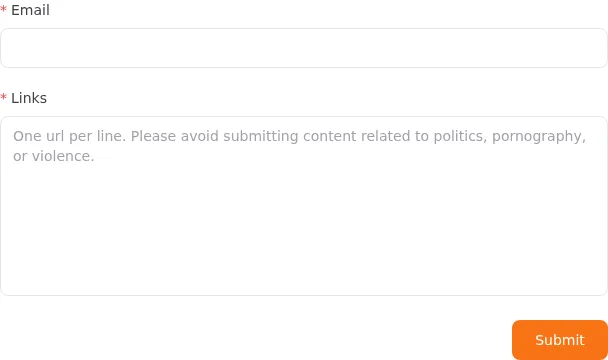
- Open the GPTs Hunter submit page, enter your email, and paste one GPT URL per line in the Links field. The archived official form warned submitters to avoid politics, pornography, and violence.
- Wait for GPTs Hunter to accept or crawl the submission, then confirm the published GPT detail page shows your builder website next to By.
- Inspect the final listing before counting the backlink. In the archived
@levelsioexample, GPTs Hunter showedBy https://levels.io, but the anchor usedrel="nofollow"; use the listing for GPT discovery and referral traffic, not as a guaranteed ranking signal.
Notes on access and link quality
During this run, the live GPTs Hunter pages returned Cloudflare verification to curl and headless Chromium, so the screenshot and link-attribute check used official Wayback snapshots of GPTs Hunter’s submit form and a public GPT detail page. A normal browser user may be able to pass the verification, but automation or SEO crawlers can see friction.
If your GPT uses Actions, OpenAI may require a valid privacy policy URL before broader sharing or GPT Store publication. Do that setup on your own domain first so the GPT listing points to the right website when GPTs Hunter mirrors or indexes it.
Backlink signals
Editorial estimates for comparing this provider.
- Dofollow linksUsually nofollowWe set this after checking whether the recommended backlink method on this provider typically outputs a dofollow link in the page HTML. If attributes vary by page type, we use the realistic default for that path and explain the nuance in the guide.
- No. We set this after checking whether the recommended backlink method on this provider typically outputs a dofollow link in the page HTML. If attributes vary by page type, we use the realistic default for that path and explain the nuance in the guide.
- Backlink valueEditorial estimateBacklink value is our 0-100 editorial estimate of how much authority a page you create here would actually carry. We score the page you would end up with - not the provider homepage - from how strongly the platform links to and indexes that page type, how much editorial review stands behind it, and what comparable pages are worth in practice. Most new pages anywhere are worth little; a few platforms hand a fresh page real strength straight away. It is a comparison estimate, not a measurement, and it will not match any third-party tool.
- 4/100. Backlink value is our 0-100 editorial estimate of how much authority a page you create here would actually carry. We score the page you would end up with - not the provider homepage - from how strongly the platform links to and indexes that page type, how much editorial review stands behind it, and what comparable pages are worth in practice. Most new pages anywhere are worth little; a few platforms hand a fresh page real strength straight away. It is a comparison estimate, not a measurement, and it will not match any third-party tool.
- Spam ratingLower is betterWe use spam score when we have a defensible value for the relevant domain or surface, otherwise a conservative Backlink Badger editorial estimate from platform quality and spam patterns. Treat it as an approximate comparison guide, not a guarantee of how search engines evaluate the site.
- 6/100. We use spam score when we have a defensible value for the relevant domain or surface, otherwise a conservative Backlink Badger editorial estimate from platform quality and spam patterns. Treat it as an approximate comparison guide, not a guarantee of how search engines evaluate the site.
- Acquisition difficultyLower is easierBacklink Badger assigns this 0–100 score from editorial review of signup friction, content requirements, approval gates, and account trust for the recommended path. It is an approximate comparison estimate, not a measured difficulty metric.
- 55/100. Backlink Badger assigns this 0–100 score from editorial review of signup friction, content requirements, approval gates, and account trust for the recommended path. It is an approximate comparison estimate, not a measured difficulty metric.
- Time estimateTypical setupWe estimate the minimum minutes a prepared user needs to sign up, set up, and publish or submit the backlink, including obvious waiting steps we can reasonably predict. This Backlink Badger estimate is approximate - your first attempt or extra verification may take longer.
- ~90 min. We estimate the minimum minutes a prepared user needs to sign up, set up, and publish or submit the backlink, including obvious waiting steps we can reasonably predict. This Backlink Badger estimate is approximate - your first attempt or extra verification may take longer.
- Free optionPaid path likelyWe mark Yes when the recommended backlink path can be completed without paying the provider for access, placement, or a required plan. If only paid tiers unlock the link, or payment is commonly required in practice, we mark No.
- No. We mark Yes when the recommended backlink path can be completed without paying the provider for access, placement, or a required plan. If only paid tiers unlock the link, or payment is commonly required in practice, we mark No.
- Linking domainsExternal signalWhen shown, this optional count comes from SEO research on the provider or relevant backlink surface and is rounded with a ~ prefix on the page. It is a Backlink Badger estimate for comparison and may be outdated or imprecise versus live crawlers.
- ~264. When shown, this optional count comes from SEO research on the provider or relevant backlink surface and is rounded with a ~ prefix on the page. It is a Backlink Badger estimate for comparison and may be outdated or imprecise versus live crawlers.
- Ranking keywordsExternal signalWhen shown, this count reflects researched ranking-keyword data for the provider domain or surface, displayed as an approximate ~ value. Treat it as a Backlink Badger comparison estimate that can drift as indexes and rankings change.
- ~22. When shown, this count reflects researched ranking-keyword data for the provider domain or surface, displayed as an approximate ~ value. Treat it as a Backlink Badger comparison estimate that can drift as indexes and rankings change.
Provider overview
GPTs Hunter is a directory for custom GPTs and AI chatbots. A listed GPT can show the builder's verified website next to the creator name, giving GPT makers a discoverable but nofollow backlink from a GPT detail page.
Minimum requirements to get a backlink from GPTs Hunter
- Public custom GPT
- ChatGPT plan with custom GPTs
- Verified builder website/domain
- GPTs Hunter submission email
Key challenges to get a backlink from GPTs Hunter
- Paid GPT setup: The practical route starts with a custom GPT, which typically means a paid ChatGPT plan and time spent making something useful.
- Verified builder link: OpenAI only shows public builder website links from verified domains, so the website must be configured before the directory listing can expose it.
- Nofollow listing link: The inspected GPTs Hunter example marked the creator website link
rel="nofollow", so treat this as discovery/referral value rather than a clean authority link. - Cloudflare and review friction: GPTs Hunter may present browser verification, and submitted GPT URLs still need to be accepted or indexed by the directory.