
How to get a backlink from Coub?
Use the Website field in your Coub channel settings, not promotional links in videos or comments. Coub’s community guidelines explicitly permit social and website links in account settings while restricting advertising in published content.
Add your website to a public channel
- Start at Coub signup. Create an account, meet the signup age requirement, and complete any email confirmation requested.
- Sign in and open settings. Look for your channel settings and the Website field. Public interface labels identify this field, but the logged-in editor’s exact layout and save-button wording were not verified for this guide.
- Enter your own canonical website URL, including
https://. Use a relevant creator, project, or personal website rather than a promotional tracking chain. - Save the change, then open your public channel in a signed-out browser. Confirm the website link is visible and points to the intended destination.
The Neqsil channel demonstrates the published result: linktr.ee/neqsil appears in the upper-right of the channel header, separate from the YouTube icon. That is an example of the website field, not a requirement to use Linktree yourself.
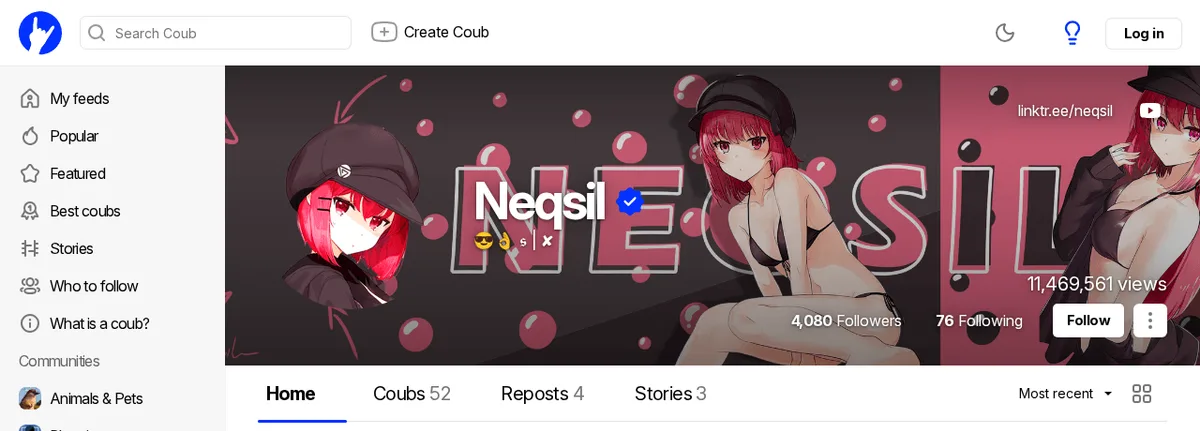
Link attributes and realistic value
The example website link was present in both fetched public HTML and the rendered browser DOM. Its anchor pointed directly to https://linktr.ee/neqsil with rel="noopener noreferrer", without nofollow, ugc, or sponsored. The recommended website-field method is therefore classified as dofollow based on that inspected public example. noopener and noreferrer are not nofollow tokens. Any later links within Linktree are a separate surface; entering your own website avoids that extra step.
This finding does not establish the behavior of links in comments, video descriptions, or every future channel. Inspect your own published link after saving: platforms can change their attributes and visibility rules.
Expect modest value from a fresh channel. The example’s followers and views belong to that creator, not to a new account. The backlink-value score of 4 is a conservative editorial estimate for a new profile page; spam score, difficulty, and time are estimates rather than independently measured SEO metrics. No profile-link payment gate was observed in the public research, but the authenticated editor was not exercised.
Avoid the advertising trap
Do not insert promotional URLs, watermarks, or QR codes into coubs to manufacture extra links. Coub’s rules distinguish permitted account-setting links from advertising in content. Use a channel you genuinely intend to maintain, keep the website relevant to its identity, and do not assume that adding a profile URL guarantees indexing or ranking gains.
Backlink signals
Editorial estimates for comparing this provider.
- Dofollow linksCan pass equityWe set this after checking whether the recommended backlink method on this provider typically outputs a dofollow link in the page HTML. If attributes vary by page type, we use the realistic default for that path and explain the nuance in the guide.
- Yes. We set this after checking whether the recommended backlink method on this provider typically outputs a dofollow link in the page HTML. If attributes vary by page type, we use the realistic default for that path and explain the nuance in the guide.
- Backlink valueEditorial estimateBacklink value is our 0-100 editorial estimate of how much authority a page you create here would actually carry. We score the page you would end up with - not the provider homepage - from how strongly the platform links to and indexes that page type, how much editorial review stands behind it, and what comparable pages are worth in practice. Most new pages anywhere are worth little; a few platforms hand a fresh page real strength straight away. It is a comparison estimate, not a measurement, and it will not match any third-party tool.
- 4/100. Backlink value is our 0-100 editorial estimate of how much authority a page you create here would actually carry. We score the page you would end up with - not the provider homepage - from how strongly the platform links to and indexes that page type, how much editorial review stands behind it, and what comparable pages are worth in practice. Most new pages anywhere are worth little; a few platforms hand a fresh page real strength straight away. It is a comparison estimate, not a measurement, and it will not match any third-party tool.
- Spam ratingLower is betterWe use spam score when we have a defensible value for the relevant domain or surface, otherwise a conservative Backlink Badger editorial estimate from platform quality and spam patterns. Treat it as an approximate comparison guide, not a guarantee of how search engines evaluate the site.
- 10/100. We use spam score when we have a defensible value for the relevant domain or surface, otherwise a conservative Backlink Badger editorial estimate from platform quality and spam patterns. Treat it as an approximate comparison guide, not a guarantee of how search engines evaluate the site.
- Acquisition difficultyLower is easierBacklink Badger assigns this 0–100 score from editorial review of signup friction, content requirements, approval gates, and account trust for the recommended path. It is an approximate comparison estimate, not a measured difficulty metric.
- 20/100. Backlink Badger assigns this 0–100 score from editorial review of signup friction, content requirements, approval gates, and account trust for the recommended path. It is an approximate comparison estimate, not a measured difficulty metric.
- Time estimateTypical setupWe estimate the minimum minutes a prepared user needs to sign up, set up, and publish or submit the backlink, including obvious waiting steps we can reasonably predict. This Backlink Badger estimate is approximate - your first attempt or extra verification may take longer.
- ~15 min. We estimate the minimum minutes a prepared user needs to sign up, set up, and publish or submit the backlink, including obvious waiting steps we can reasonably predict. This Backlink Badger estimate is approximate - your first attempt or extra verification may take longer.
- Free optionNo required spendWe mark Yes when the recommended backlink path can be completed without paying the provider for access, placement, or a required plan. If only paid tiers unlock the link, or payment is commonly required in practice, we mark No.
- Yes. We mark Yes when the recommended backlink path can be completed without paying the provider for access, placement, or a required plan. If only paid tiers unlock the link, or payment is commonly required in practice, we mark No.
Provider overview
Coub is a community for short looping videos. Its public channel pages can display a website link, and its community rules explicitly allow website and social links in account settings.
Minimum requirements to get a backlink from Coub
- Coub account
- Website URL
Key challenges to get a backlink from Coub
- Profile only: Coub permits account-setting links but restricts promotional links, watermarks, and QR codes in published content.
- Login required: Editing the website field requires an account; the authenticated editor layout was not tested for this guide.
- Fresh-page value: A new channel does not inherit an established creator's followers, views, or search visibility.
Similar providers

PBase
Dofollow · Free
- Time estimateWe estimate the minimum minutes a prepared user needs to sign up, set up, and publish or submit the backlink, including obvious waiting steps we can reasonably predict. This Backlink Badger estimate is approximate - your first attempt or extra verification may take longer.
- 15m

MyAnimeList
Dofollow · Free
- Time estimateWe estimate the minimum minutes a prepared user needs to sign up, set up, and publish or submit the backlink, including obvious waiting steps we can reasonably predict. This Backlink Badger estimate is approximate - your first attempt or extra verification may take longer.
- 15m

Flickr
Dofollow · Free
- Time estimateWe estimate the minimum minutes a prepared user needs to sign up, set up, and publish or submit the backlink, including obvious waiting steps we can reasonably predict. This Backlink Badger estimate is approximate - your first attempt or extra verification may take longer.
- 15m