
How to get a backlink from LiveJournal?
LiveJournal is best treated as a profile-and-journal backlink source, not as a high-growth social channel. The cleanest path is to create a public account and add your site as the profile Website link; journal-entry links are possible, but they should be used only when the entry is legitimate and useful.
Method 1: Add your site to the public profile Website field
- Create a free account from LiveJournal’s join page or log in if you already have one.
- Open the profile settings area. Anonymous checks of
https://www.livejournal.com/manage/profile/redirect to login, so expect this step to be behind the account gate. - Add your destination URL in the profile’s Website or homepage field.
- Save the profile and open the public profile URL, usually
https://username.livejournal.com/profile/. - Confirm the Website link is visible on the public page before counting it as acquired.
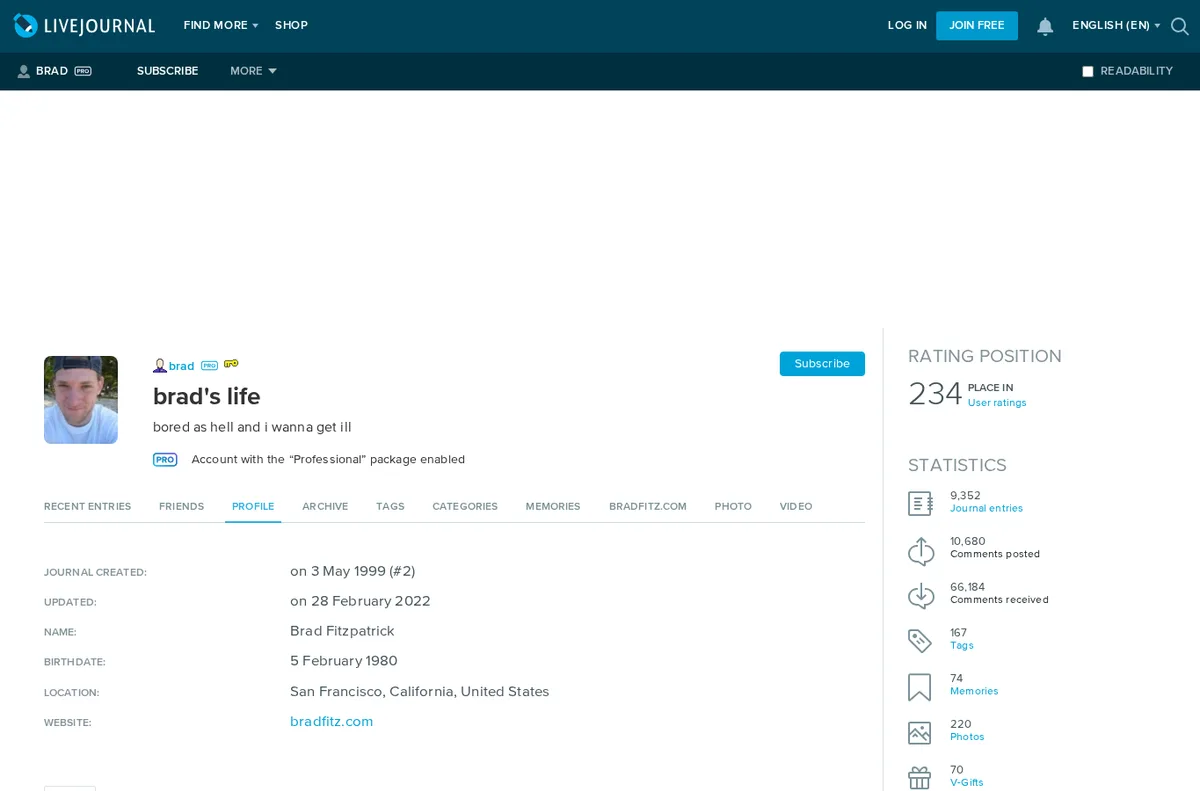
A public LiveJournal profile example shows the Website link in the profile navigation and profile details. In the raw HTML, the sampled website anchor points directly to http://bradfitz.com/ with rel="me" and without nofollow, ugc, or sponsored tokens.
Method 2: Use journal entries only when the link belongs in the post
LiveJournal’s support FAQ explains that users can add links to another journal or website in entries with normal HTML, with the Visual Editor’s Insert/Edit Link button, or by typing a full http:// or https:// URL. That makes contextual entry links possible, but this is a weaker and riskier method than the profile Website field.
Use entry links for real journal content: a project update, a long-form note, a community explanation, or a reference that helps readers. Do not create thin posts whose only purpose is dropping a URL. LiveJournal explicitly says links must comply with its rules for published materials, and low-value promotional posts are more likely to be ignored or moderated.
Link quality notes
The verified profile Website link is a direct external anchor and looked dofollow in the sampled public HTML because the only rel token was me. Treat the authority as modest anyway: the backlink lives on an individual user profile/journal page, not on LiveJournal’s homepage, and a new account will not inherit the root domain’s historic authority automatically.
Backlink signals
Editorial estimates for comparing this provider.
- Dofollow linksCan pass equityWe set this after checking whether the recommended backlink method on this provider typically outputs a dofollow link in the page HTML. If attributes vary by page type, we use the realistic default for that path and explain the nuance in the guide.
- Yes. We set this after checking whether the recommended backlink method on this provider typically outputs a dofollow link in the page HTML. If attributes vary by page type, we use the realistic default for that path and explain the nuance in the guide.
- Backlink valueEditorial estimateBacklink value is our 0-100 editorial estimate of how much authority a page you create here would actually carry. We score the page you would end up with - not the provider homepage - from how strongly the platform links to and indexes that page type, how much editorial review stands behind it, and what comparable pages are worth in practice. Most new pages anywhere are worth little; a few platforms hand a fresh page real strength straight away. It is a comparison estimate, not a measurement, and it will not match any third-party tool.
- 5/100. Backlink value is our 0-100 editorial estimate of how much authority a page you create here would actually carry. We score the page you would end up with - not the provider homepage - from how strongly the platform links to and indexes that page type, how much editorial review stands behind it, and what comparable pages are worth in practice. Most new pages anywhere are worth little; a few platforms hand a fresh page real strength straight away. It is a comparison estimate, not a measurement, and it will not match any third-party tool.
- Spam ratingLower is betterWe use spam score when we have a defensible value for the relevant domain or surface, otherwise a conservative Backlink Badger editorial estimate from platform quality and spam patterns. Treat it as an approximate comparison guide, not a guarantee of how search engines evaluate the site.
- 2/100. We use spam score when we have a defensible value for the relevant domain or surface, otherwise a conservative Backlink Badger editorial estimate from platform quality and spam patterns. Treat it as an approximate comparison guide, not a guarantee of how search engines evaluate the site.
- Acquisition difficultyLower is easierBacklink Badger assigns this 0–100 score from editorial review of signup friction, content requirements, approval gates, and account trust for the recommended path. It is an approximate comparison estimate, not a measured difficulty metric.
- 20/100. Backlink Badger assigns this 0–100 score from editorial review of signup friction, content requirements, approval gates, and account trust for the recommended path. It is an approximate comparison estimate, not a measured difficulty metric.
- Time estimateTypical setupWe estimate the minimum minutes a prepared user needs to sign up, set up, and publish or submit the backlink, including obvious waiting steps we can reasonably predict. This Backlink Badger estimate is approximate - your first attempt or extra verification may take longer.
- ~10 min. We estimate the minimum minutes a prepared user needs to sign up, set up, and publish or submit the backlink, including obvious waiting steps we can reasonably predict. This Backlink Badger estimate is approximate - your first attempt or extra verification may take longer.
- Free optionNo required spendWe mark Yes when the recommended backlink path can be completed without paying the provider for access, placement, or a required plan. If only paid tiers unlock the link, or payment is commonly required in practice, we mark No.
- Yes. We mark Yes when the recommended backlink path can be completed without paying the provider for access, placement, or a required plan. If only paid tiers unlock the link, or payment is commonly required in practice, we mark No.
Provider overview
LiveJournal is an older blogging and community platform where public journals and profile pages can include external website links. The most predictable backlink path is the profile Website field, which renders as a direct public link on the user's LiveJournal profile.
Minimum requirements to get a backlink from LiveJournal
- LiveJournal account
- Public profile
- Destination website URL
- Optional profile context
Key challenges to get a backlink from LiveJournal
- Old platform: LiveJournal profiles are public, but fresh accounts may get little discovery unless the journal is actually used.
- Account gate: The profile-editing workflow requires a logged-in LiveJournal account.
- Content rules: Entry and profile links still need to comply with LiveJournal's published-material rules, so spammy promotional posting is risky.
Similar providers

Myspace
Dofollow · Free
- Time estimateWe estimate the minimum minutes a prepared user needs to sign up, set up, and publish or submit the backlink, including obvious waiting steps we can reasonably predict. This Backlink Badger estimate is approximate - your first attempt or extra verification may take longer.
- 10m

Disqus
Dofollow · Free
- Time estimateWe estimate the minimum minutes a prepared user needs to sign up, set up, and publish or submit the backlink, including obvious waiting steps we can reasonably predict. This Backlink Badger estimate is approximate - your first attempt or extra verification may take longer.
- 10m

Beacons.ai
Dofollow · Free
- Time estimateWe estimate the minimum minutes a prepared user needs to sign up, set up, and publish or submit the backlink, including obvious waiting steps we can reasonably predict. This Backlink Badger estimate is approximate - your first attempt or extra verification may take longer.
- 10m