
How to get a backlink from Telegraph?
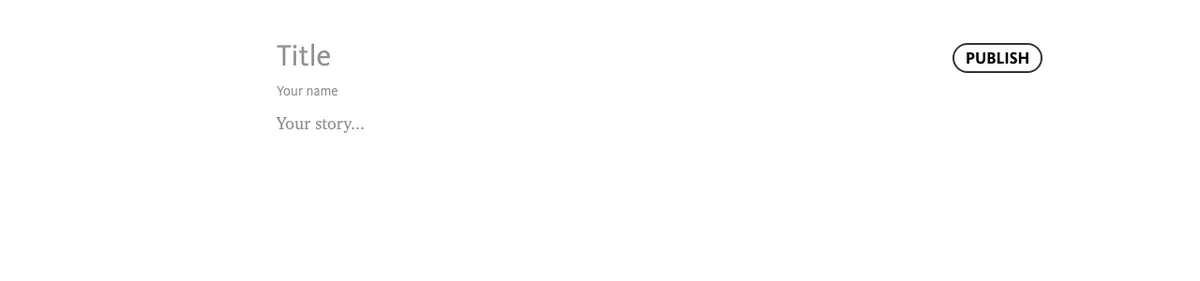
Telegraph is probably the fastest article backlink on the web: the homepage is the editor, there is no signup, and pressing PUBLISH immediately creates a public page at telegra.ph/<your-title>-<date>. The catch is that every outbound link is nofollow, so treat this as a quick indexable mention rather than an authority play.
Steps
- Open telegra.ph - the page you land on is the editor itself.
- Fill in Title and optionally Your name (any name works; there is no account).
- Write your article in the Your story… area. Select any text to open the formatting toolbar and use the link button to attach your URL to the selected anchor text. Pasting a bare URL also works.
- Click PUBLISH in the top-right corner. The article is instantly live and publicly accessible - there is no review queue.
- Save the final URL somewhere safe, and keep using the same browser if you want to edit the page later.
What the published link looks like
Telegraph pages are server-rendered plain HTML, marked index, follow with a canonical URL, so the pages themselves are crawlable and often get indexed. The outbound links, however, are rewritten with a nofollow attribute. A link published during our research rendered exactly as:
<a href="https://example.com/" target="_blank" rel="nofollow">Example link</a>The href is direct (no redirect wrapper), but the rel="nofollow" means Google is told not to pass authority through it. The same pattern is visible on Telegraph’s own API documentation page, where every external link to telegram.org carries rel="nofollow".
Notes and tips
- Keep your edit access. Authorship is tied to a token in your browser’s local storage. If you want durable control, connect Telegraph to the @Telegraph Telegram bot, which lets you manage your pages from your Telegram account.
- Don’t expect discovery. Nothing on telegra.ph links to your new article. Its practical value comes from sharing the URL (Telegram chats render Telegraph posts as Instant View pages), from the page getting indexed for long-tail queries, and from having a neutral, instantly publishable page to point other links at.
- Avoid spammy patterns. Because the platform is abused so heavily, thin pages stuffed with links fit a known spam fingerprint. A short, genuinely readable article with one or two contextual links is more likely to stay up, get indexed, and be worth clicking.
Backlink signals
Editorial estimates for comparing this provider.
- Dofollow linksUsually nofollowWe set this after checking whether the recommended backlink method on this provider typically outputs a dofollow link in the page HTML. If attributes vary by page type, we use the realistic default for that path and explain the nuance in the guide.
- No. We set this after checking whether the recommended backlink method on this provider typically outputs a dofollow link in the page HTML. If attributes vary by page type, we use the realistic default for that path and explain the nuance in the guide.
- Backlink valueEditorial estimateBacklink value is our 0-100 editorial estimate of how much authority a page you create here would actually carry. We score the page you would end up with - not the provider homepage - from how strongly the platform links to and indexes that page type, how much editorial review stands behind it, and what comparable pages are worth in practice. Most new pages anywhere are worth little; a few platforms hand a fresh page real strength straight away. It is a comparison estimate, not a measurement, and it will not match any third-party tool.
- 3/100. Backlink value is our 0-100 editorial estimate of how much authority a page you create here would actually carry. We score the page you would end up with - not the provider homepage - from how strongly the platform links to and indexes that page type, how much editorial review stands behind it, and what comparable pages are worth in practice. Most new pages anywhere are worth little; a few platforms hand a fresh page real strength straight away. It is a comparison estimate, not a measurement, and it will not match any third-party tool.
- Spam ratingLower is betterWe use spam score when we have a defensible value for the relevant domain or surface, otherwise a conservative Backlink Badger editorial estimate from platform quality and spam patterns. Treat it as an approximate comparison guide, not a guarantee of how search engines evaluate the site.
- 8/100. We use spam score when we have a defensible value for the relevant domain or surface, otherwise a conservative Backlink Badger editorial estimate from platform quality and spam patterns. Treat it as an approximate comparison guide, not a guarantee of how search engines evaluate the site.
- Acquisition difficultyLower is easierBacklink Badger assigns this 0–100 score from editorial review of signup friction, content requirements, approval gates, and account trust for the recommended path. It is an approximate comparison estimate, not a measured difficulty metric.
- 5/100. Backlink Badger assigns this 0–100 score from editorial review of signup friction, content requirements, approval gates, and account trust for the recommended path. It is an approximate comparison estimate, not a measured difficulty metric.
- Time estimateTypical setupWe estimate the minimum minutes a prepared user needs to sign up, set up, and publish or submit the backlink, including obvious waiting steps we can reasonably predict. This Backlink Badger estimate is approximate - your first attempt or extra verification may take longer.
- ~5 min. We estimate the minimum minutes a prepared user needs to sign up, set up, and publish or submit the backlink, including obvious waiting steps we can reasonably predict. This Backlink Badger estimate is approximate - your first attempt or extra verification may take longer.
- Free optionNo required spendWe mark Yes when the recommended backlink path can be completed without paying the provider for access, placement, or a required plan. If only paid tiers unlock the link, or payment is commonly required in practice, we mark No.
- Yes. We mark Yes when the recommended backlink path can be completed without paying the provider for access, placement, or a required plan. If only paid tiers unlock the link, or payment is commonly required in practice, we mark No.
Provider overview
Telegraph is a minimalist anonymous publishing tool built by the Telegram team. Anyone can write a richly formatted article and publish it instantly to a public, server-rendered page at telegra.ph, with no account or signup required. Outbound links in articles are direct but carry rel="nofollow".
Minimum requirements to get a backlink from Telegraph
- Web browser
- Article content
Key challenges to get a backlink from Telegraph
- Nofollow links: Telegraph server-renders every outbound link in an article with
rel="nofollow", so the link passes no direct authority. - No account or recovery: Edit access lives in your browser's local storage (or an API token). Clear your browser data without saving the token and you permanently lose the ability to edit the page.
- Orphaned pages: There is no directory, feed, or author archive. A new article gets zero internal links, so it is only discovered if you share the URL yourself.
- Spam reputation: Telegraph is heavily abused for spam and phishing, so some networks and filters block telegra.ph URLs, and abusive pages can be taken down.
Similar providers

ShortURL
Nofollow · Free
- Time estimateWe estimate the minimum minutes a prepared user needs to sign up, set up, and publish or submit the backlink, including obvious waiting steps we can reasonably predict. This Backlink Badger estimate is approximate - your first attempt or extra verification may take longer.
- 5m

Pinterest
Nofollow · Free
- Time estimateWe estimate the minimum minutes a prepared user needs to sign up, set up, and publish or submit the backlink, including obvious waiting steps we can reasonably predict. This Backlink Badger estimate is approximate - your first attempt or extra verification may take longer.
- 5m

LinkedIn
Nofollow · Free
- Time estimateWe estimate the minimum minutes a prepared user needs to sign up, set up, and publish or submit the backlink, including obvious waiting steps we can reasonably predict. This Backlink Badger estimate is approximate - your first attempt or extra verification may take longer.
- 5m