
How to get a backlink from Sony Electronics Community?
Sony Electronics Community is useful only if you have a real reason to maintain a Sony support-community profile. The safest backlink path is the public profile/About Me area: add your website as part of a real identity or project description, then use the community for legitimate Sony product discussions.
Best method: add a website URL to your public profile
- Open the Sony Electronics Community and choose Sign In.
- Sign in or create a Sony account. In this run, the Sony account page redirected to an Akamai access-denied screen, so use a normal browser if the account screen blocks automated/headless access.
- Open your community profile and edit the public About Me or profile text area.
- Add a short, relevant description and include your website URL as plain text. Do not create a profile whose only purpose is a link.
- Save the profile and open the public profile URL in a private window to confirm the link is visible.
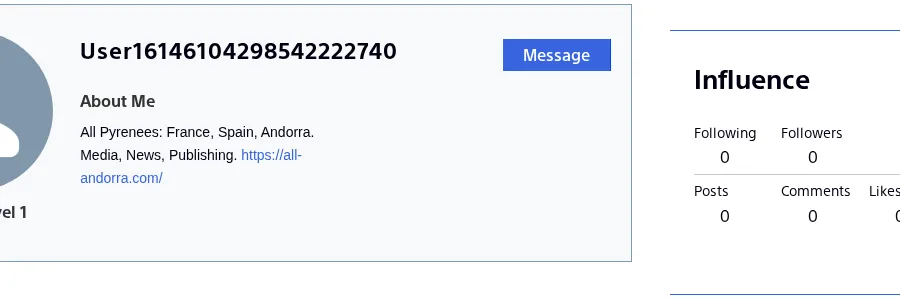
A public profile example currently renders an external URL in the About Me text:
Link quality notes
The inspected profile rendered this direct external anchor in the browser DOM:
<a href="https://all-andorra.com/" target="_blank" rel="noopener">https://all-andorra.com/</a>That is not a nofollow, ugc, or sponsored link in the rendered DOM. However, the raw fetched HTML for the profile is a Salesforce Experience Cloud shell and does not include the external URL before JavaScript runs. For Backlink Badger scoring, that makes this a JavaScript-rendered profile link rather than a clean dofollow backlink, so the page is marked dofollow: false.
Do not use support posts as link drops
Sony’s community is organized around product-support questions and answers. URLs can appear in community content, but a support thread should only include a link when it genuinely helps solve the Sony-related question. If your site is not directly relevant to the discussion, keep the link in the profile instead of posting it into threads.
Backlink signals
Editorial estimates for comparing this provider.
- Dofollow linksUsually nofollowWe set this after checking whether the recommended backlink method on this provider typically outputs a dofollow link in the page HTML. If attributes vary by page type, we use the realistic default for that path and explain the nuance in the guide.
- No. We set this after checking whether the recommended backlink method on this provider typically outputs a dofollow link in the page HTML. If attributes vary by page type, we use the realistic default for that path and explain the nuance in the guide.
- Backlink valueEditorial estimateBacklink value is our 0-100 editorial estimate of how much authority a page you create here would actually carry. We score the page you would end up with - not the provider homepage - from how strongly the platform links to and indexes that page type, how much editorial review stands behind it, and what comparable pages are worth in practice. Most new pages anywhere are worth little; a few platforms hand a fresh page real strength straight away. It is a comparison estimate, not a measurement, and it will not match any third-party tool.
- 4/100. Backlink value is our 0-100 editorial estimate of how much authority a page you create here would actually carry. We score the page you would end up with - not the provider homepage - from how strongly the platform links to and indexes that page type, how much editorial review stands behind it, and what comparable pages are worth in practice. Most new pages anywhere are worth little; a few platforms hand a fresh page real strength straight away. It is a comparison estimate, not a measurement, and it will not match any third-party tool.
- Spam ratingLower is betterWe use spam score when we have a defensible value for the relevant domain or surface, otherwise a conservative Backlink Badger editorial estimate from platform quality and spam patterns. Treat it as an approximate comparison guide, not a guarantee of how search engines evaluate the site.
- 1/100. We use spam score when we have a defensible value for the relevant domain or surface, otherwise a conservative Backlink Badger editorial estimate from platform quality and spam patterns. Treat it as an approximate comparison guide, not a guarantee of how search engines evaluate the site.
- Acquisition difficultyLower is easierBacklink Badger assigns this 0–100 score from editorial review of signup friction, content requirements, approval gates, and account trust for the recommended path. It is an approximate comparison estimate, not a measured difficulty metric.
- 35/100. Backlink Badger assigns this 0–100 score from editorial review of signup friction, content requirements, approval gates, and account trust for the recommended path. It is an approximate comparison estimate, not a measured difficulty metric.
- Time estimateTypical setupWe estimate the minimum minutes a prepared user needs to sign up, set up, and publish or submit the backlink, including obvious waiting steps we can reasonably predict. This Backlink Badger estimate is approximate - your first attempt or extra verification may take longer.
- ~20 min. We estimate the minimum minutes a prepared user needs to sign up, set up, and publish or submit the backlink, including obvious waiting steps we can reasonably predict. This Backlink Badger estimate is approximate - your first attempt or extra verification may take longer.
- Free optionNo required spendWe mark Yes when the recommended backlink path can be completed without paying the provider for access, placement, or a required plan. If only paid tiers unlock the link, or payment is commonly required in practice, we mark No.
- Yes. We mark Yes when the recommended backlink path can be completed without paying the provider for access, placement, or a required plan. If only paid tiers unlock the link, or payment is commonly required in practice, we mark No.
Provider overview
Sony Electronics Community is Sony's public support community for consumer electronics questions, answers, and member profiles. The backlink opportunity is a conservative profile/About Me URL, not a place to drop promotional support posts.
Minimum requirements to get a backlink from Sony Electronics Community
- Sony account
- Public community profile
- Relevant profile bio
- Non-promotional support participation
Key challenges to get a backlink from Sony Electronics Community
- JavaScript-rendered link: The verified profile URL appears in the rendered page, but not in raw fetched HTML, so treat it as a visibility link rather than a clean crawlable dofollow backlink.
- Login friction: Sony account sign-in redirected to an access-denied account page in this headless run, so profile-editor labels may differ for real users.
- Support-community moderation: Irrelevant promotional posts are a bad fit for an official customer-support forum.
Similar providers

Vimeo
Nofollow · Free
- Time estimateWe estimate the minimum minutes a prepared user needs to sign up, set up, and publish or submit the backlink, including obvious waiting steps we can reasonably predict. This Backlink Badger estimate is approximate - your first attempt or extra verification may take longer.
- 20m

ReverbNation
Nofollow · Free
- Time estimateWe estimate the minimum minutes a prepared user needs to sign up, set up, and publish or submit the backlink, including obvious waiting steps we can reasonably predict. This Backlink Badger estimate is approximate - your first attempt or extra verification may take longer.
- 20m

Flipboard
Nofollow · Free
- Time estimateWe estimate the minimum minutes a prepared user needs to sign up, set up, and publish or submit the backlink, including obvious waiting steps we can reasonably predict. This Backlink Badger estimate is approximate - your first attempt or extra verification may take longer.
- 20m