
How to get a backlink from Zoho Sites?
The useful route is to publish a small, genuinely useful site or landing page and add a direct external link. Do not treat the Zoho domain’s reputation as instant authority: a new zohosites.com subdomain is still a brand-new page that needs useful content and discovery of its own.
Method: Add a direct button link
- Create a Zoho Sites account and choose a template that fits the page you intend to publish.
- Add original copy, images, and enough context for the destination link to help a visitor. A one-line backlink shell is not worth building.
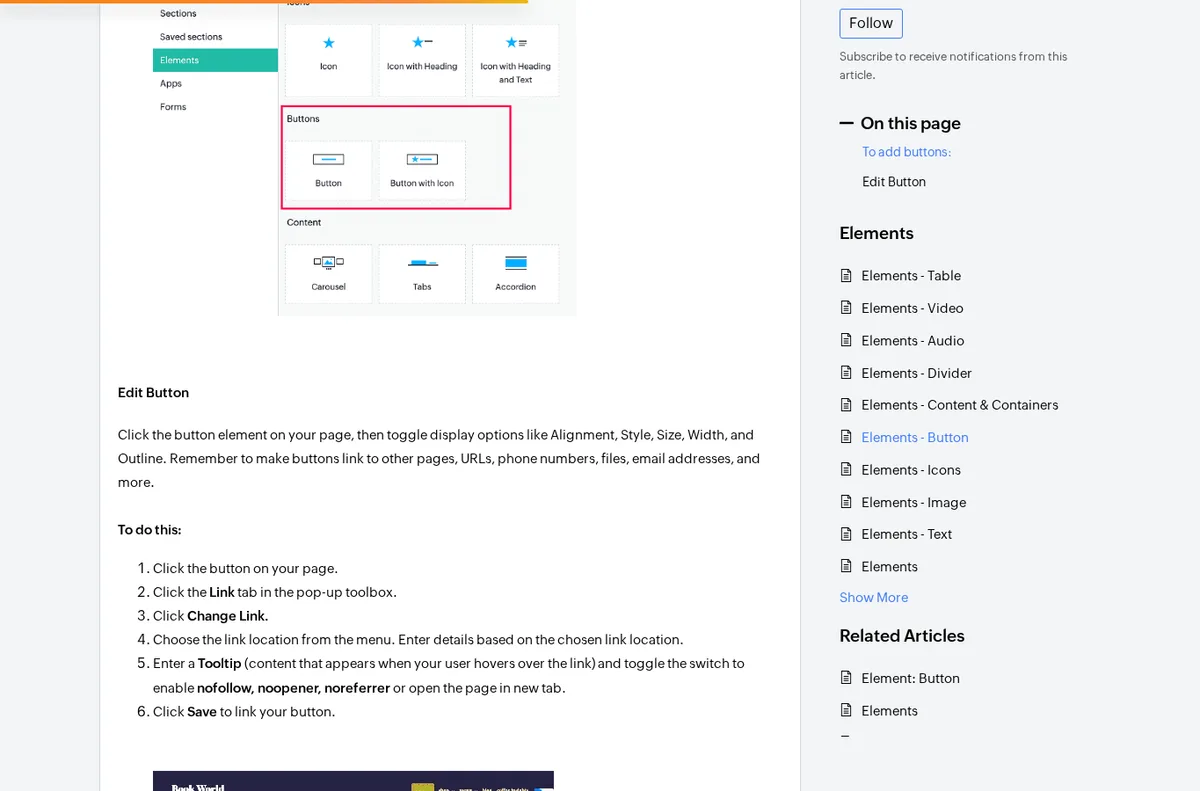
- In the builder, select Add → Element, then drag a Button into the relevant section.
- Select the button, open Link, choose Change Link, and enter the full external URL.
- Leave the nofollow toggle disabled if you want a direct dofollow link. Zoho also exposes
noopenerandnoreferrer; those tokens do not turn the anchor into nofollow. - Preview the site, click the link to verify its destination, then use Publish. On the first publication, Zoho documents options for a free subdomain, a new domain, or a mapped domain.
Zoho’s help article shows the button link controls and the optional link-attribute toggles:
An external link can also be added as a menu item through Configuration → Menus → Add Menu Item → External Link. Use that only when the destination belongs in the site’s navigation; a contextual button usually gives readers a clearer reason to click.
What the published link looks like
The public UK Game of the Show and EuroPlay site includes partner-image links to external sites. In the fetched page HTML, the Kwalee partner link points directly to https://www.kwalee.com/ with an empty rel attribute—no nofollow, ugc, sponsored, or redirect wrapper. A second partner link to https://loading.bar/ has the same direct-link pattern.
That evidence supports dofollow: true for the specific button/image-link configuration described here, not for every link Zoho Sites can render. Inspect your own published anchor after every template or element change, because the editor lets authors enable nofollow deliberately.
Cost, indexing, and realistic value
Zoho’s current website-builder comparison says a basic ad-free plan is available at no cost, while its pricing page foregrounds a 15-day trial for Starter and Pro. Start with the free path if it appears for your account, but check the live plan limits before investing heavily in a build.
Zoho says it generates XML sitemaps so search engines can discover published pages. That makes a legitimate hosted site crawlable, but it does not make a fresh subdomain authoritative. The backlink becomes more useful when the page serves a real audience, earns internal structure, and attracts links of its own.
Backlink signals
Editorial estimates for comparing this provider.
- Dofollow linksCan pass equityWe set this after checking whether the recommended backlink method on this provider typically outputs a dofollow link in the page HTML. If attributes vary by page type, we use the realistic default for that path and explain the nuance in the guide.
- Yes. We set this after checking whether the recommended backlink method on this provider typically outputs a dofollow link in the page HTML. If attributes vary by page type, we use the realistic default for that path and explain the nuance in the guide.
- Backlink valueEditorial estimateBacklink value is our 0-100 editorial estimate of how much authority a page you create here would actually carry. We score the page you would end up with - not the provider homepage - from how strongly the platform links to and indexes that page type, how much editorial review stands behind it, and what comparable pages are worth in practice. Most new pages anywhere are worth little; a few platforms hand a fresh page real strength straight away. It is a comparison estimate, not a measurement, and it will not match any third-party tool.
- 2/100. Backlink value is our 0-100 editorial estimate of how much authority a page you create here would actually carry. We score the page you would end up with - not the provider homepage - from how strongly the platform links to and indexes that page type, how much editorial review stands behind it, and what comparable pages are worth in practice. Most new pages anywhere are worth little; a few platforms hand a fresh page real strength straight away. It is a comparison estimate, not a measurement, and it will not match any third-party tool.
- Spam ratingLower is betterWe use spam score when we have a defensible value for the relevant domain or surface, otherwise a conservative Backlink Badger editorial estimate from platform quality and spam patterns. Treat it as an approximate comparison guide, not a guarantee of how search engines evaluate the site.
- 2/100. We use spam score when we have a defensible value for the relevant domain or surface, otherwise a conservative Backlink Badger editorial estimate from platform quality and spam patterns. Treat it as an approximate comparison guide, not a guarantee of how search engines evaluate the site.
- Acquisition difficultyLower is easierBacklink Badger assigns this 0–100 score from editorial review of signup friction, content requirements, approval gates, and account trust for the recommended path. It is an approximate comparison estimate, not a measured difficulty metric.
- 35/100. Backlink Badger assigns this 0–100 score from editorial review of signup friction, content requirements, approval gates, and account trust for the recommended path. It is an approximate comparison estimate, not a measured difficulty metric.
- Time estimateTypical setupWe estimate the minimum minutes a prepared user needs to sign up, set up, and publish or submit the backlink, including obvious waiting steps we can reasonably predict. This Backlink Badger estimate is approximate - your first attempt or extra verification may take longer.
- ~30 min. We estimate the minimum minutes a prepared user needs to sign up, set up, and publish or submit the backlink, including obvious waiting steps we can reasonably predict. This Backlink Badger estimate is approximate - your first attempt or extra verification may take longer.
- Free optionNo required spendWe mark Yes when the recommended backlink path can be completed without paying the provider for access, placement, or a required plan. If only paid tiers unlock the link, or payment is commonly required in practice, we mark No.
- Yes. We mark Yes when the recommended backlink path can be completed without paying the provider for access, placement, or a required plan. If only paid tiers unlock the link, or payment is commonly required in practice, we mark No.
Provider overview
Zoho Sites is a hosted website builder that lets you publish pages on a free subdomain or mapped domain. A direct button, image, or menu link can be dofollow when you leave Zoho's optional nofollow setting disabled.
Minimum requirements to get a backlink from Zoho Sites
- Zoho account
- Page copy and images
- Destination URL
Key challenges to get a backlink from Zoho Sites
- Build a real page: A thin page made only for a backlink is unlikely to earn visitors, links, or meaningful authority.
- Fresh subdomain: A new hosted site starts with almost no page-level authority despite Zoho's strong root domain.
- Link settings: Zoho lets editors enable nofollow, so check the published anchor instead of assuming every element has the same attributes.
- Plan ambiguity: Zoho advertises a free basic plan on one current product page while its pricing page emphasizes a 15-day premium trial; limits can vary.
Similar providers

Weebly
Dofollow · Free
- Time estimateWe estimate the minimum minutes a prepared user needs to sign up, set up, and publish or submit the backlink, including obvious waiting steps we can reasonably predict. This Backlink Badger estimate is approximate - your first attempt or extra verification may take longer.
- 30m

PBworks
Dofollow · Free
- Time estimateWe estimate the minimum minutes a prepared user needs to sign up, set up, and publish or submit the backlink, including obvious waiting steps we can reasonably predict. This Backlink Badger estimate is approximate - your first attempt or extra verification may take longer.
- 30m

Google Sites
Dofollow · Free
- Time estimateWe estimate the minimum minutes a prepared user needs to sign up, set up, and publish or submit the backlink, including obvious waiting steps we can reasonably predict. This Backlink Badger estimate is approximate - your first attempt or extra verification may take longer.
- 30m