
How to get a backlink from Airtable Marketplace?
Airtable Marketplace can provide a backlink when your team publishes a genuine Airtable extension or script. The link opportunity comes from your approved public marketplace listing: Airtable’s submission guide asks for a support URL, and live listings can expose that support website beside publisher contact details.
Steps
- Decide whether your product can honestly be packaged as an Airtable extension or script that helps Airtable users solve a workflow problem.
- Read Airtable’s extension documentation, then build and test the extension locally with Airtable’s developer tools.
- Polish the app before submission: write clear user-facing copy, add useful onboarding, handle errors, and make the workflow understandable to reviewers and end users.
- Prepare the marketplace listing metadata Airtable requests, including extension name, square extension icon, publisher name, publisher icon, short and long descriptions, screenshots, support email, support URL, reviewer instructions, a walkthrough video if useful, and an example base invite link.
- Submit the extension from the project directory using Airtable’s
block submitflow and respond to any review feedback.
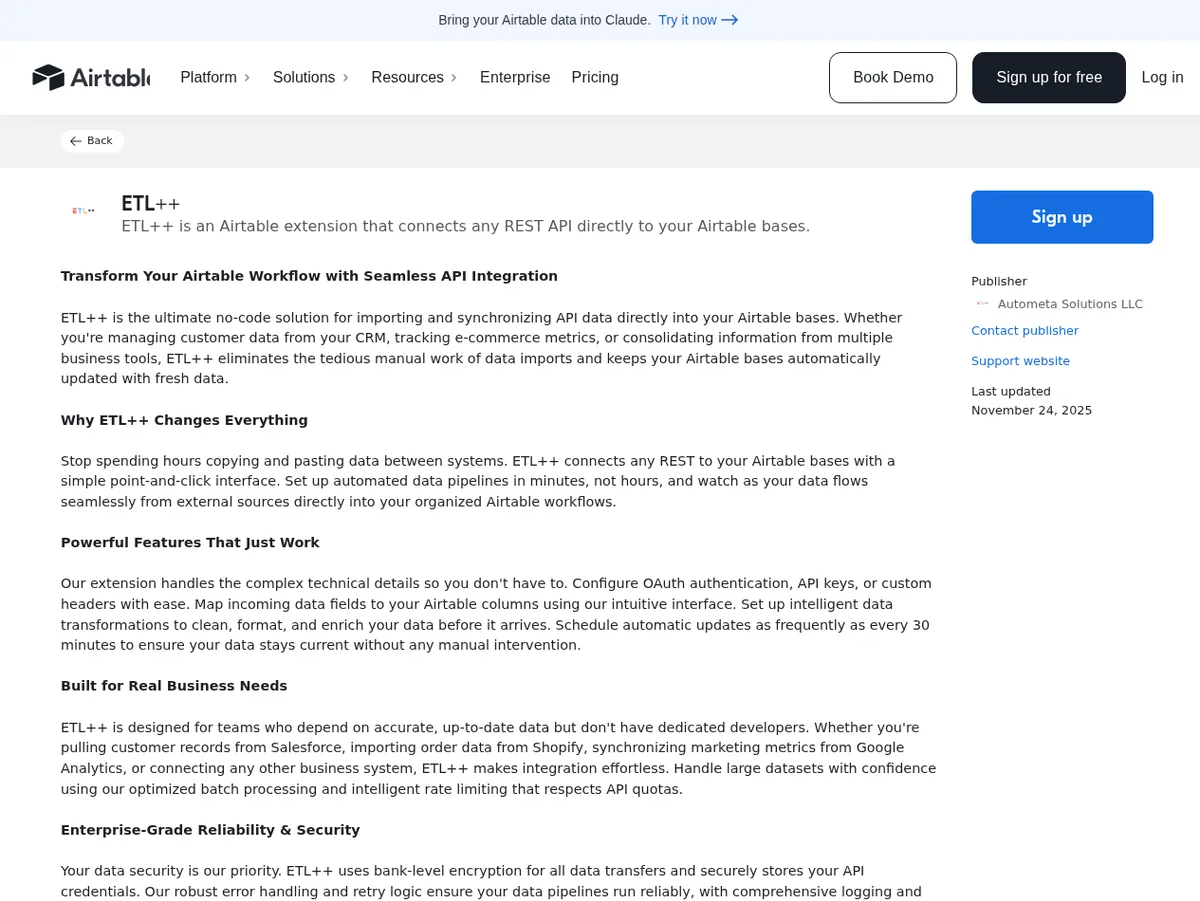
- After approval, open the public marketplace listing and confirm the support website points to the correct canonical page for your project or documentation.
Example: the public ETL++ Airtable Marketplace listing displays Autometa Solutions LLC as the publisher and includes a “Support website” link to external documentation. In the observed page, that link used rel="noopener noreferrer" rather than nofollow, but you should re-check the rendered listing because marketplace link attributes can change.
Use this only when you can support a real Airtable app. Thin or purely promotional submissions are unlikely to pass marketplace review, and the time cost is much higher than simple profile or directory backlinks.
Backlink signals
Editorial estimates for comparing this provider.
- Dofollow linksCan pass equityWe set this after checking whether the recommended backlink method on this provider typically outputs a dofollow link in the page HTML. If attributes vary by page type, we use the realistic default for that path and explain the nuance in the guide.
- Yes. We set this after checking whether the recommended backlink method on this provider typically outputs a dofollow link in the page HTML. If attributes vary by page type, we use the realistic default for that path and explain the nuance in the guide.
- Backlink valueEditorial estimateBacklink value is our 0-100 editorial estimate of how much authority a page you create here would actually carry. We score the page you would end up with - not the provider homepage - from how strongly the platform links to and indexes that page type, how much editorial review stands behind it, and what comparable pages are worth in practice. Most new pages anywhere are worth little; a few platforms hand a fresh page real strength straight away. It is a comparison estimate, not a measurement, and it will not match any third-party tool.
- 12/100. Backlink value is our 0-100 editorial estimate of how much authority a page you create here would actually carry. We score the page you would end up with - not the provider homepage - from how strongly the platform links to and indexes that page type, how much editorial review stands behind it, and what comparable pages are worth in practice. Most new pages anywhere are worth little; a few platforms hand a fresh page real strength straight away. It is a comparison estimate, not a measurement, and it will not match any third-party tool.
- Spam ratingLower is betterWe use spam score when we have a defensible value for the relevant domain or surface, otherwise a conservative Backlink Badger editorial estimate from platform quality and spam patterns. Treat it as an approximate comparison guide, not a guarantee of how search engines evaluate the site.
- 4/100. We use spam score when we have a defensible value for the relevant domain or surface, otherwise a conservative Backlink Badger editorial estimate from platform quality and spam patterns. Treat it as an approximate comparison guide, not a guarantee of how search engines evaluate the site.
- Acquisition difficultyLower is easierBacklink Badger assigns this 0–100 score from editorial review of signup friction, content requirements, approval gates, and account trust for the recommended path. It is an approximate comparison estimate, not a measured difficulty metric.
- 80/100. Backlink Badger assigns this 0–100 score from editorial review of signup friction, content requirements, approval gates, and account trust for the recommended path. It is an approximate comparison estimate, not a measured difficulty metric.
- Time estimateTypical setupWe estimate the minimum minutes a prepared user needs to sign up, set up, and publish or submit the backlink, including obvious waiting steps we can reasonably predict. This Backlink Badger estimate is approximate - your first attempt or extra verification may take longer.
- ~360 min. We estimate the minimum minutes a prepared user needs to sign up, set up, and publish or submit the backlink, including obvious waiting steps we can reasonably predict. This Backlink Badger estimate is approximate - your first attempt or extra verification may take longer.
- Free optionNo required spendWe mark Yes when the recommended backlink path can be completed without paying the provider for access, placement, or a required plan. If only paid tiers unlock the link, or payment is commonly required in practice, we mark No.
- Yes. We mark Yes when the recommended backlink path can be completed without paying the provider for access, placement, or a required plan. If only paid tiers unlock the link, or payment is commonly required in practice, we mark No.
- Linking domainsExternal signalWhen shown, this optional count comes from SEO research on the provider or relevant backlink surface and is rounded with a ~ prefix on the page. It is a Backlink Badger estimate for comparison and may be outdated or imprecise versus live crawlers.
- ~71,300. When shown, this optional count comes from SEO research on the provider or relevant backlink surface and is rounded with a ~ prefix on the page. It is a Backlink Badger estimate for comparison and may be outdated or imprecise versus live crawlers.
- Ranking keywordsExternal signalWhen shown, this count reflects researched ranking-keyword data for the provider domain or surface, displayed as an approximate ~ value. Treat it as a Backlink Badger comparison estimate that can drift as indexes and rankings change.
- ~41,800. When shown, this count reflects researched ranking-keyword data for the provider domain or surface, displayed as an approximate ~ value. Treat it as a Backlink Badger comparison estimate that can drift as indexes and rankings change.
Provider overview
Airtable Marketplace is the public directory for Airtable extensions, scripts, templates, and interfaces. Developers who build a useful Airtable extension or script can submit it for review, and approved listings can include publisher details, contact information, and a support website link that points back to the developer's own documentation or product site.
Minimum requirements to get a backlink from Airtable Marketplace
- Airtable account
- Real extension or script
- Marketplace listing assets
- Support URL and email
- Reviewer instructions
- Blocks CLI submission
Key challenges to get a backlink from Airtable Marketplace
Airtable Marketplace is a moderated software marketplace, not a quick profile-link site. A backlink requires building a real Airtable extension or script, preparing a complete marketplace listing, passing Airtable's review, and maintaining support resources for users. Submissions need screenshots, publisher details, support contact information, reviewer instructions, and a working extension submitted through Airtable's developer tools.
Similar providers

IBM Community
Dofollow · Free
- Time estimateWe estimate the minimum minutes a prepared user needs to sign up, set up, and publish or submit the backlink, including obvious waiting steps we can reasonably predict. This Backlink Badger estimate is approximate - your first attempt or extra verification may take longer.
- 120m

TED
Nofollow · Free
- Time estimateWe estimate the minimum minutes a prepared user needs to sign up, set up, and publish or submit the backlink, including obvious waiting steps we can reasonably predict. This Backlink Badger estimate is approximate - your first attempt or extra verification may take longer.
- 240m

BuzzFeed
Dofollow · Free
- Time estimateWe estimate the minimum minutes a prepared user needs to sign up, set up, and publish or submit the backlink, including obvious waiting steps we can reasonably predict. This Backlink Badger estimate is approximate - your first attempt or extra verification may take longer.
- 90m