
How to get a backlink from SitePoint Forums?
SitePoint Forums is worth considering only when you have something useful to add to a developer discussion. The backlink path is a normal Discourse forum post or reply, so treat it like community participation first and SEO second.
Best method: add a contextual link in a helpful forum post
- Create or sign in to a SitePoint account from the community signup page.
- Browse the existing categories before posting. Active sections include HTML & CSS, JavaScript, PHP, Design & UX, Business, CMS & WordPress, Databases, Server Config, and Domains.
- Choose a thread where your link genuinely helps the question, or start a new topic when the resource is part of a real technical question or explanation.
- Write the answer in plain English and include the external URL in context. Do not post a thin “check out my site” reply.
- Publish the post and watch for replies or moderator action. SitePoint’s guidelines say flags are reviewed by moderators, and moderators can remove content or accounts.
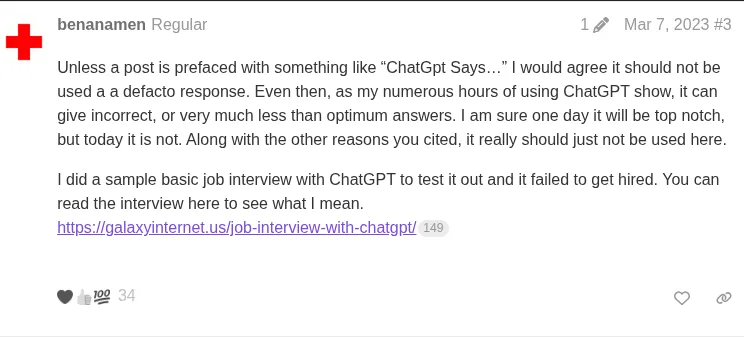
This public SitePoint reply shows an external resource link inside a real forum discussion. The inspected anchor pointed directly to the external URL with rel="noopener" and no nofollow, ugc, or sponsored token at the time of research.
Link quality notes
The inspected forum-post links were dofollow-looking because they did not include a nofollow-style rel token. That does not make SitePoint a place for link dropping. Forum links are user-generated, visible to moderators, and easiest to keep when they answer a real developer problem.
Use SitePoint for links to documentation, tutorials, examples, demos, or case studies that belong in the thread. Avoid AI-spun answers, copied snippets, irrelevant SaaS pitches, and private-message outreach; the guidelines specifically call out post quality, English-language discussion, and no spam or self-promotion in personal messages.
Backlink signals
Editorial estimates for comparing this provider.
- Dofollow linksCan pass equityWe set this after checking whether the recommended backlink method on this provider typically outputs a dofollow link in the page HTML. If attributes vary by page type, we use the realistic default for that path and explain the nuance in the guide.
- Yes. We set this after checking whether the recommended backlink method on this provider typically outputs a dofollow link in the page HTML. If attributes vary by page type, we use the realistic default for that path and explain the nuance in the guide.
- Backlink valueEditorial estimateBacklink value is our 0-100 editorial estimate of how much authority a page you create here would actually carry. We score the page you would end up with - not the provider homepage - from how strongly the platform links to and indexes that page type, how much editorial review stands behind it, and what comparable pages are worth in practice. Most new pages anywhere are worth little; a few platforms hand a fresh page real strength straight away. It is a comparison estimate, not a measurement, and it will not match any third-party tool.
- 13/100. Backlink value is our 0-100 editorial estimate of how much authority a page you create here would actually carry. We score the page you would end up with - not the provider homepage - from how strongly the platform links to and indexes that page type, how much editorial review stands behind it, and what comparable pages are worth in practice. Most new pages anywhere are worth little; a few platforms hand a fresh page real strength straight away. It is a comparison estimate, not a measurement, and it will not match any third-party tool.
- Spam ratingLower is betterWe use spam score when we have a defensible value for the relevant domain or surface, otherwise a conservative Backlink Badger editorial estimate from platform quality and spam patterns. Treat it as an approximate comparison guide, not a guarantee of how search engines evaluate the site.
- 2/100. We use spam score when we have a defensible value for the relevant domain or surface, otherwise a conservative Backlink Badger editorial estimate from platform quality and spam patterns. Treat it as an approximate comparison guide, not a guarantee of how search engines evaluate the site.
- Acquisition difficultyLower is easierBacklink Badger assigns this 0–100 score from editorial review of signup friction, content requirements, approval gates, and account trust for the recommended path. It is an approximate comparison estimate, not a measured difficulty metric.
- 65/100. Backlink Badger assigns this 0–100 score from editorial review of signup friction, content requirements, approval gates, and account trust for the recommended path. It is an approximate comparison estimate, not a measured difficulty metric.
- Time estimateTypical setupWe estimate the minimum minutes a prepared user needs to sign up, set up, and publish or submit the backlink, including obvious waiting steps we can reasonably predict. This Backlink Badger estimate is approximate - your first attempt or extra verification may take longer.
- ~45 min. We estimate the minimum minutes a prepared user needs to sign up, set up, and publish or submit the backlink, including obvious waiting steps we can reasonably predict. This Backlink Badger estimate is approximate - your first attempt or extra verification may take longer.
- Free optionNo required spendWe mark Yes when the recommended backlink path can be completed without paying the provider for access, placement, or a required plan. If only paid tiers unlock the link, or payment is commonly required in practice, we mark No.
- Yes. We mark Yes when the recommended backlink path can be completed without paying the provider for access, placement, or a required plan. If only paid tiers unlock the link, or payment is commonly required in practice, we mark No.
Provider overview
SitePoint Forums is a Discourse community for web developers and designers. A backlink can fit when it appears inside a useful forum question or answer, not as a standalone promotion.
Minimum requirements to get a backlink from SitePoint Forums
- SitePoint account
- Relevant web-development topic
- Useful external resource
Key challenges to get a backlink from SitePoint Forums
- Moderation risk: Staff and community flags can remove posts or accounts that look like link drops.
- Relevance requirement: Links need to support a real web-development discussion instead of hijacking an old thread.
- No AI-spun answers: The guidelines explicitly reject AI-generated answers to other users' posts.